Showing posts with label facebook. Show all posts

Facebook Hacking With Keylogger

Tutorial hacking facebook this time about hacking facebook using Keylogger. Keylogger software can steal your username and password facebook we lho! There is a Keylogger software Where?

Actually Keylogger is a kind of software that is used to monitor activity computer keyboard, each key press by the user, all records will be saved with the Keylogger.

For regular parents monitor their children it is the currently browsing the how to install Keylogger in your computer, so all the sites in the "search" by the child will be recorded by Keylogger. so all the porn sites that smell can be discovered by the parents.

Usual in its akan Keylogger detection by the virus as "antivirus", because it can be a Keylogger 2 blade that can be secure and can also kill.

Meaning it is shut off, Keylogger can be in use by only those who are not responsible for the conduct of hacking, many people want to try to hack the social networking sites like facebook and friendster.

So stay on the computer installed ago people who use computers will be recorded throughout its activities, including activities include "username and password" facebook and friendster. This can only be done by the owner of the cafe fraudulent and is not responsible, or can only be done by the user's computer before it shut off with the way its antiviral function first and then install Keylogger ago.

To download Keylogger, it can be downloaded at

http://rapidshare.com/files/191921436/Aio_Keyloggers_Pack.part1.rar http://rapidshare.com/files/191921436/Aio_Keyloggers_Pack.part1.rar

http://rapidshare.com/files/191921441/Aio_Keyloggers_Pack.part2.rar http://rapidshare.com/files/191921441/Aio_Keyloggers_Pack.part2.rar

Update New Teknik Hacking Facebook
Baca Selengkapnya - Facebook Hacking With Keylogger

Download Facebook Desktop Manager

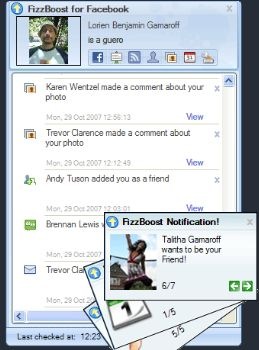
FizzBoost Facebook is one of the best Desktop Manager at this time. FizzBoost function of almost the same as fbQuick.  Facebook Desktop Manager software can download facebook  for free only on this blog facebook. Remember!It's Free .Learn More. How?


To download a free Facebook Desktop Manager, can click the image below:


 . NB: facebook application, if this can be installed in the PC / laptop you already installed the driver. NET Framework 2.0.
Baca Selengkapnya - Download Facebook Desktop Manager

MerubahTampilan / Layouts Facebook


Panduan Merubah tampilan Facebook
(Rubah dgn Koleksi Wallpapper Facebook bahkan dengan Background Koleksi Foto kamu)
-------------------------------------
- Instal Plugin-Add on Yontoo Layers
http://www.yontoo.com/install.aspx , Pilih Firefox
- Di kotak baru Terms of Service Pilih "accept & continue"
- atau kesini : http://www.yontoo.com/DownloadFFClient.aspx Klik "accept & continue"
- Install Yontoo Layers for firefox ,setelah "Ready" tercentang klik "start Install"
- Klik "Allow" di pojok kanan atas klu ada perintah itu...
- klik "Install now" setelah selesai "restart Firefox"
- buka : http://apps.facebook.com/pagerage/
- ikuti petunjuk2 dari link tersebut (pagerage)

Modif Warna:
http://apps.facebook.com/pagerage/
Koleksi Layout/Wallpapper Facebook :
http://www.pagerage.com/


************************************************

Untuk memasukan Layout dengan Koleksi foto kita
buka : http://apps.facebook.com/pagerage/
Dipojok kiri atas klik "Create Your Own Backgrounds!"

atau bisa langsung dibuka :
http://apps.facebook.com/pagerage/CustomLayoutCanvas.aspx

Setelah itu :
Step #1 Perintah menginstal ADD_ON Yontoo layer (jika belum terinstal)
Step #2 Memasukan Background gambar/foto, setelah Klik "load" Gambar/Foto harus ada di Scaled Preview
Step #3 Memilih Warna Font dan setting transparansi (show advanced Setting)
Step #4 Apply Background
Step #5 Kembali/Cek Profile Facebook

** Untuk step #2 yg dimasukan adalah link adrees foto, contohnya seperti ini : http://img266.imageshack.us/img266/9981/numpangidupdd4.jpg
** untuk mendapatkan link seperti itu kamu bisa upload foto kamu anata lain melalui :
- http://www.freeimagehosting.net/
- http://www.imageshack.us/
- dan masih banyak lagi

Baca Selengkapnya - MerubahTampilan / Layouts Facebook
 

Copyright Harga HP Terbaru © 2010 - All right reserved. Powered by Wordpress Hostgator Hosting whos online